When a stream runs
Set a pull or a push to run every few minutes, within chosen hours, on chosen days, or once a day, and see every run before you save.
When it runs is the first section of every pull's and push's editor, because it decides most of what a stream costs. You answer a few questions in turn: how often, during which hours, on which days, and on which city's clock. Under them, sanda draws the schedule you made, run by run, with what it costs a month, before you save anything.
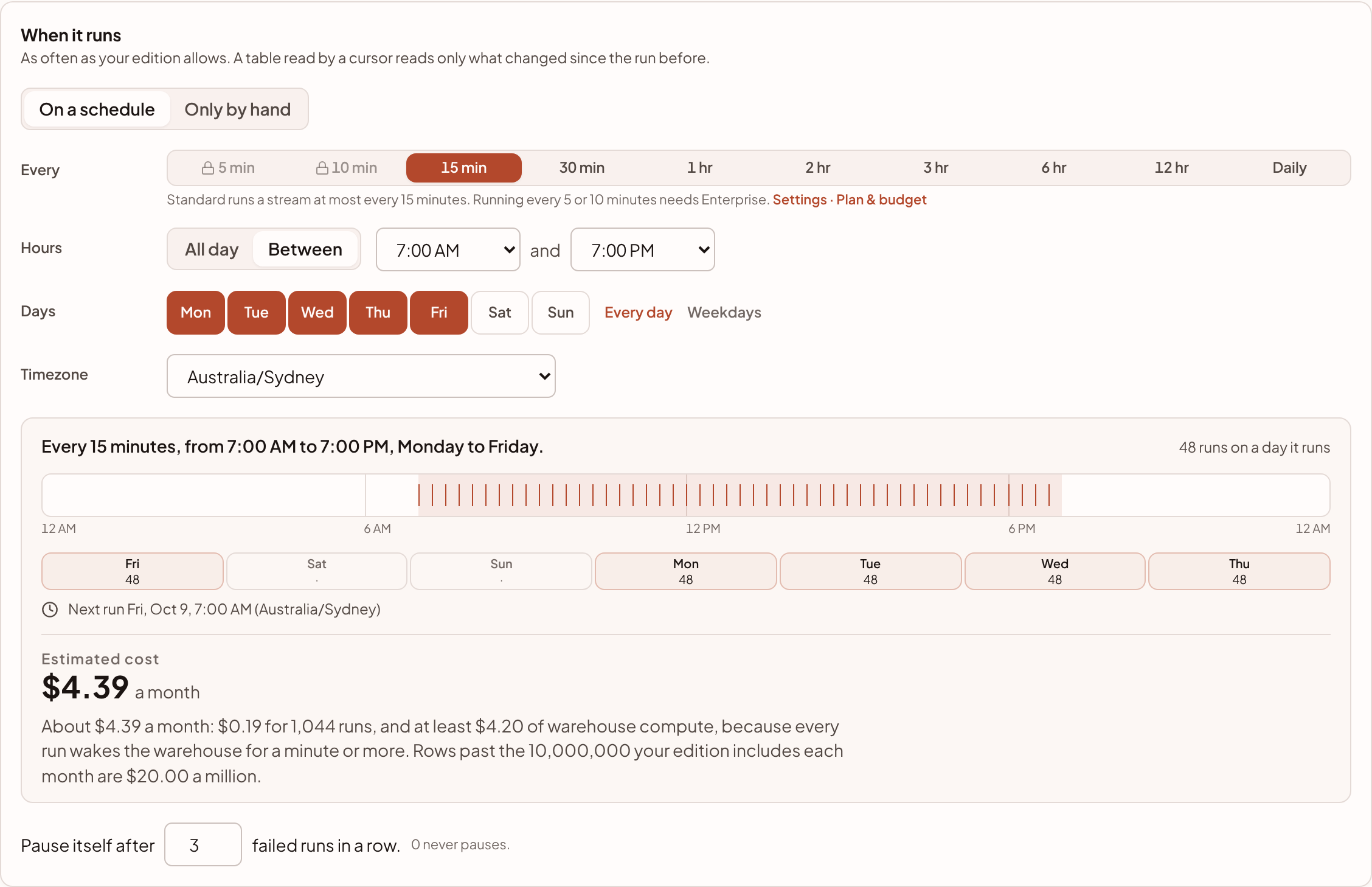
On a schedule or only by hand
- On a schedule runs the stream by itself, on the choices below.
- Only by hand never starts it by itself. It runs when someone presses Run now (or, for a push, when the sync or pull it runs after lands).
How often
Every offers every 5, 10, 15 or 30 minutes, every hour, every 2, 3, 6 or 12 hours or once a day.
Your edition sets the shortest: Standard runs a stream at most every 15 minutes, and Enterprise as often as every 5 minutes. The faster choices stay on screen with a lock and say which edition has them, so you can see the limit is your edition's. A stream keeps its own clock, so it isn't tied to the grid the rest of sanda's schedules run on.
Hours and days
- Hours (for anything more often than once a day): All day, or Between two hours. The second hour is the one it stops by, so every 15 minutes between 7:00 AM and 7:00 PM runs first at 7:00 AM and last at 6:45 PM.
- At (once a day): the hour and the minute, to the 5 minutes.
- Days: tick the days it runs. Every day and Weekdays tick them at once. A schedule needs at least one day.
A stream that only matters while your team is working is much cheaper on its hours: every 15 minutes between 7:00 AM and 7:00 PM on weekdays is a fraction of the runs of every 15 minutes all week.
The timezone
Hours and days are read on the clock of the Timezone you choose, and stay at the same local time when the clocks change: 7:00 AM in Sydney is 7:00 AM in winter and in summer. A schedule that runs all day, every day, has no time of day to keep, so it runs at the same moments whichever city you name. The timezone then only says how its runs are shown.
Before you save
Under the choices, sanda shows:
- The schedule in one sentence, such as "Every 15 minutes, from 7:00 AM to 7:00 PM, Monday to Friday." The stream's card says it the same way.
- The coming day as a line from midnight to midnight, with a mark at every run and the hours it runs within shaded, and how many runs that day has.
- The next seven days, each with its number of runs, so a day it skips is easy to see.
- The next run, on the clock of the timezone you chose.
- The estimated cost a month at that schedule. See what streams cost.
A schedule set another way
A schedule that isn't one of these choices (set another way than this editor sets one) is shown as it was set, and keeps running exactly as it is. Replace it with a new schedule swaps it for one made here, and nothing changes until you save.
Pause itself after
Under the schedule, Pause itself after says how many failed runs in a row stop the stream. 0 never pauses it. See when runs fail.
Something unclear or out of date? Tell us, and we will fix the page.