Build and refresh an index
How a search index is built, how to watch its progress, how to keep it fresh, what it costs, and what to do when a build fails.
Creating an index starts its first build. After that you keep it fresh by indexing what has changed. This page covers what a build does, how to watch one, what triggers a refresh, and what to do when something goes wrong.
What a build does
A build reads the table behind your index in key order and, for each row, compares its text with what is already indexed. Only rows whose text is new or has changed are sent to be embedded. A row whose filter values changed but whose text did not is updated in place, with no AI call at all.
So the first build embeds everything, and later builds embed only what moved. Refreshing an index over a table where one row changed costs one embedding, plus the compute to read the table.
Rows deleted from the source are removed from the index at the end of a pass that has read the whole table.
Builds run in slices
A large index does not build in one go. sanda works in slices, stops at the end of each, keeps its place, and carries on from there. That is not a failure. Rows indexed by an earlier slice are searchable straight away, so an index answers while it is still building, from what it has so far.
sanda's scheduler runs on the quarter hour. A build you queue starts at the next :00, :15, :30 or :45, which is a 15 minute grid. A scheduled slice has about four minutes to work in.
Watch a build
Open the index on Intelligence · Vector search.
- The index list shows a pill for each index: indexing with a count of rows read, paused, broken, empty, or the number of rows once it is indexed.
- Search records shows a strip while a build is in flight: "Next indexing slice at 5:30 AM" or "Indexing is in progress", with the rows read so far, and View progress.
- Build history shows the live build and every earlier one.
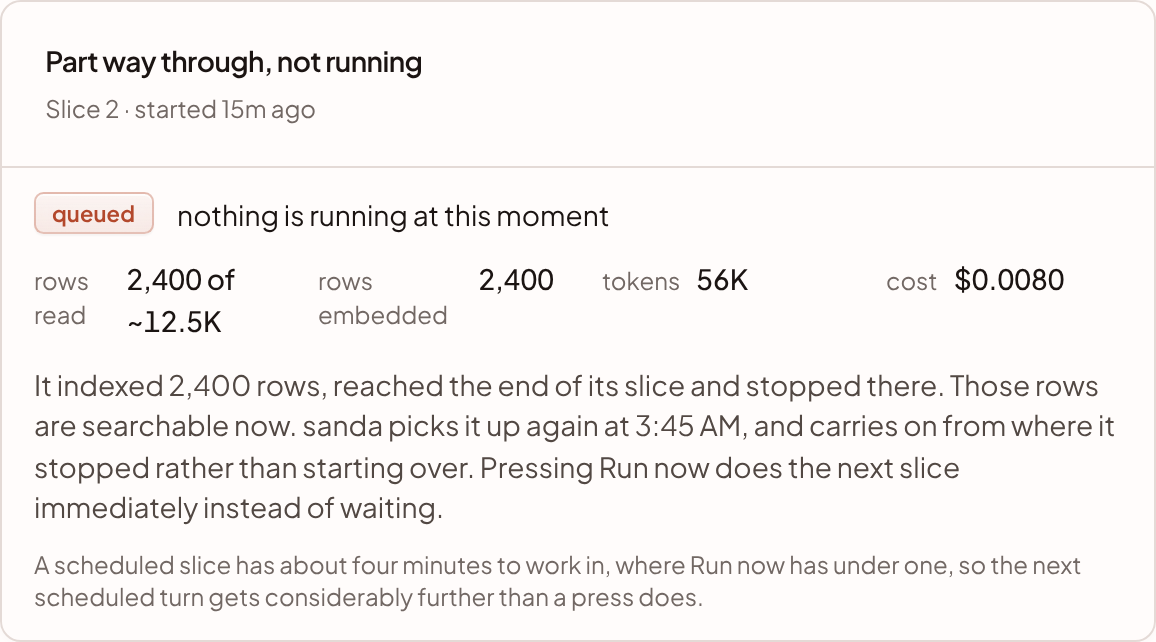
The live panel is titled Indexing now while a slice runs, Part way through, not running between slices, and Waiting to start before the first. It shows rows read against the table's approximate size, rows embedded, tokens and cost.
The Builds table lists each attempt: when it ran, what started it (a sync, its schedule, this console, an agent, or sanda), rows read and embedded, tokens, cost and compute used, and the outcome: indexed, queued, running, failed or cancelled. Open a build to see its slices.
Run now
While a build is waiting for the scheduler, Run now appears on Index details. It indexes for one request instead of waiting. A press has under a minute to work in, so a big index takes several presses, or you can leave it to the scheduler. Use it to see your first results sooner.
Keep it fresh
An index has one of three triggers for refreshing, shown as a pill beside its status:
| Pill | What it means |
|---|---|
| manual | It is refreshed when you ask |
| after a connection's name | It is refreshed each time that connection lands rows |
| A schedule | It is refreshed on the schedule the pill shows, on the quarter-hour grid |
An index you create in the console is manual. The form does not set a trigger. To set one, use an AI assistant connected over MCP with the search permission: it can set an index to refresh after a connection's sync, or on a schedule. After a sync is usually the right trigger. See MCP tools.
To refresh by hand, open Index details and press:
- Index what changed. Queues an incremental build: only changed text is embedded. This is the button to use day to day.
- Rebuild everything. Replaces the whole index from scratch. Use it only when you need to, because it costs what the first build cost.
Both also clear a suspension, described below.
What it costs
Each build shows its own cost. Indexing spends three things:
- AI. Embedding tokens are billed like any other AI call and count towards your daily AI limit. Indexing uses only 80% of a day's limit, so that questions still work later in the day. When it reaches that, the build pauses until midnight UTC and picks up where it stopped. Syncs and questions are not affected.
- Compute. Reading and writing runs on your warehouse compute. The Billed column shows the compute each build used.
- Storage. Index size counts towards your warehouse storage.
Pause, resume and remove
- Pause indexing cancels any queued or running build and stops automatic refreshes. Searches keep working on what is already indexed. Resume indexing turns refreshing back on.
- Remove deletes the index from your warehouse, after you confirm. Building it again costs a full first build.
If an owner switches sanda search off, every index is paused and searching stops until it is switched back on. See sanda search.
When a build fails
A build fails when it hits something that will not fix itself. The index shows broken with the reason under its name. A broken index keeps answering from what it had.
Common causes, and what to do:
| Reason | What to do |
|---|---|
| The table is no longer on the semantic map | Put it back on the map, or remove the index |
| The key column is empty on some rows, or repeats | Fix the data, or remove the index and create it again with a different key |
| The embedding option is no longer offered | Remove the index and create it again |
| The warehouse is not ready | Check it on the Warehouse page |
Some things only pause a build. If the warehouse is at its storage limit, the build waits until there is room. If the warehouse is suspended for its budget, sanda tries again an hour later. Neither counts as a failure.
By default, after three failures in a row, sanda stops trying automatically. If alerts are on under Settings · Plan & budget, it emails the alert recipients, at most once a day for each index, with the setting When a scheduled run fails, or pauses itself after failing repeatedly. When you have fixed the cause, press Index what changed to try again.
Something unclear or out of date? Tell us, and we will fix the page.