Stream a Postgres database
Read tables from a PostgreSQL database you run into your warehouse every few minutes, new and changed rows only, with nothing to write or approve.
A Postgres stream reads tables from a PostgreSQL database you run (your shop's, your booking system's, your own application's) and lands them in your warehouse, as often as every few minutes. Each run reads only the rows that changed since the last.
Postgres is a published source: sanda wrote the code that reads it and runs it as its own, so every workspace has it and there is no connector for cherry to write or for anyone to approve. You connect the database, choose its tables, and set a schedule.
Before you start
The database needs three things, because sanda reaches it over the internet:
- An address on the internet. A name such as
db.example.com, or a public address. sanda refuses a private address (10.x.x.x,192.168.x.xand the like) and a name only your own network knows (localhost, a name ending.localor.internal, or a name with no dots). A stream doesn't connect from the fixed address a connection uses, so the database's firewall must let connections in from anywhere, protected by its password and TLS. - TLS, with a certificate from a public certificate authority. sanda connects with TLS and checks the certificate, so the password and every row are encrypted on the way and a server pretending to be yours is refused. A database whose certificate comes from a private authority can't be reached yet; most hosted databases use a public one.
- A user of its own that may only read. Create a user for sanda and grant it
selecton the tables you want streamed, and nothing else. sanda reads every page inside a read-only transaction as well, so the database itself refuses a write, but a user that can't write is the first line.
create role sanda_reader login password 'a long random password';
grant usage on schema public to sanda_reader;
grant select on public.orders, public.order_lines to sanda_reader;
Only owners and admins connect a database and make a stream on it, because sanda signs in to it on the whole workspace's behalf.
Connect the database
- Open Streams in. Go to Data · Streams and open the Streams in tab. Under Published sources, press Connect a database beside Postgres.
- Say where it is. Type its Host, its Port (leave it empty for 5432) and the Database name. Name is optional: it is how streams name this database.
- Type the username and password of the user you made for sanda.
- Press Sign in and connect. sanda signs in and reads one row before it keeps anything. A wrong password, a database name that doesn't exist or a database it can't reach is a sentence under the form, and nothing is stored. When it works, sanda stores the password encrypted. It is never shown again, in the console or to cherry.
The database is listed under Postgres by its name and its username. Sign in again replaces the username and password (after you change the password at the database), and Disconnect forgets them. A stream on a database that is disconnected waits until you choose another for it.
Make a stream
- Start it. Press New stream in at the top of the Streams in tab, or Stream beside Postgres. If your workspace also has approved connectors, choose Postgres under Reads from.
- Name it. Its tables are named after it: a stream called
shoplands theorderstable inraw.shop__orders. - Choose the database, and, if your workspace has more than one warehouse, the warehouse it lands in. The warehouse is chosen once.
- Choose its tables. What it reads lists the tables and views this database lets the user read. Tick each one to stream, and for each choose how it is read (below).
- Choose when it runs, and press Save stream. sanda checks the tables against the database again before it saves, so a stream that saves is a stream that can read. Saving reads nothing yet: press Run now, or wait for its schedule.
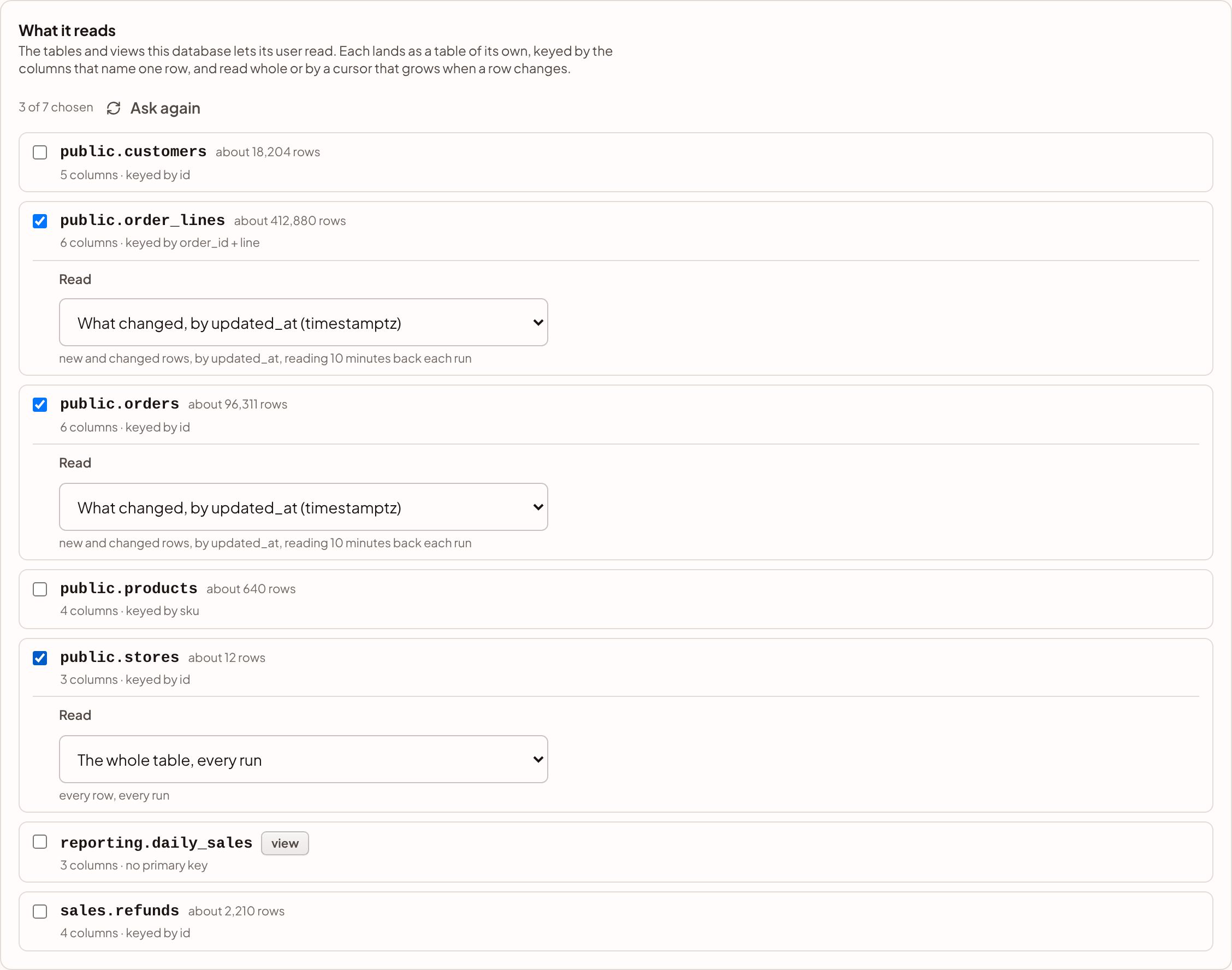
How each table is read
Each table needs a key: the columns that name one row, so a row read twice is still one row in your warehouse. A table's primary key is its key. A table with no primary key, or a view, asks you to tick the columns that name a row. For a table those are columns that are never empty; a view's columns can't say that, so a view takes any you choose, and a row whose key is empty is counted and not landed.
Then Read chooses one of two ways:
| Read | What a run reads | When a row is deleted at the database |
|---|---|---|
| What changed, by a column | Rows whose column is at or after where the last run got to, less a lookback. The column is the table's cursor | Its row stays in your warehouse: a cursor never sees a deletion |
| The whole table, every run | Every row, every run. For small tables such as stores or price lists | Its row is marked _deleted_at |
A cursor is a column that is never empty and grows when a row changes: a time, a date or a whole number. An updated_at column, kept up to date by your application or a trigger, is the usual one, and sanda chooses it for you when the table has one. A whole number, such as an id that only grows, finds new rows but not changed ones.
A time or date cursor reads 10 minutes back each run. Postgres stamps a row with the time its transaction began, so a row written by a transaction that was still open when the last run read can carry a time just behind where it got to. Re-reading a few minutes catches it, and rows that didn't change cost nothing.
A run reads each table a page of 2,000 rows at a time, in cursor and key order. One page may take at most 60 seconds; an index on the cursor and the key makes each page quick, and is worth adding for a large table.
What lands in your warehouse
Each table lands in your warehouse's raw schema as a table of its own, named after the stream and the table. A table outside the public schema has its schema in front: sales.refunds in a stream called shop lands in raw.shop__sales_refunds. The name stays while the table is on the stream, even if the stream is renamed, because views are built on it.
Every column lands typed by the column it came from, not guessed from its values:
| In the database | In your warehouse |
|---|---|
boolean |
boolean |
smallint, integer, bigint |
bigint, exactly, however large |
real, double precision, numeric |
numeric, exactly |
date |
date |
timestamp, timestamp with time zone |
the same, to the microsecond |
json, jsonb, and lists of whole numbers, text, uuids or true and false |
jsonb |
anything else (uuid, text, time, interval, enums) |
text, exactly as Postgres writes it |
Like every stream in, each row also keeps the whole row as it was read in _record, when it last changed in _synced_at, and _deleted_at for a row a whole-table read no longer found. See where the records land.
Change a stream
Edit, on the stream's page, changes everything but the warehouse. A new name, schedule or description saves without signing in to the database, so it saves even while the database is down. Changing the tables, a key or a cursor, or the database the stream reads, checks the tables against the database again. A table you take off keeps its table in your warehouse, with what it landed.
The stream's page lists each table it reads, its key and how it is read. A run's detail lists each page it read, as SELECT sales.orders on db.example.com with its size and how long it took.
When something goes wrong
| What you see | What to do |
|---|---|
| The database refused the username and password | The stream waits, rather than failing again and again. Press Sign in again on the stream's page, or beside the database under Published sources, and type the new password |
| A table no longer exists, or the user can no longer see it | Grant the user select on it again, or take it off the stream with Edit |
| A column the stream reads by is gone | Choose the table's key and cursor again with Edit |
| Reading a table took longer than 60 seconds a page | Add an index on the cursor and the key, then Run now |
| sanda couldn't make a verified TLS connection | The database must use TLS with a certificate from a public certificate authority |
| The database would not take another connection, or didn't answer | Nothing to do: the run tries again, and the next run carries on from the last page that landed |
A failed run counts toward the stream pausing itself, as any stream's does. See runs.
Limits
- A stream reads at most 30 tables. Make a second stream for the rest.
- What it reads lists the first 500 tables and views, by schema and name, and leaves out the database's own system schemas. A partitioned table is listed once, as itself.
- One run lands at most 5,000,000 rows, so a large first load is several runs, each carrying on from the last.
A Postgres stream is billed like any stream in: a charge for each run that does its work, and the rows it lands past what your edition includes. See what streams cost.
Something unclear or out of date? Tell us, and we will fix the page.