Actions and approvals
How Sam asks before it changes anything, what Ask first and Autonomous mean, and the few actions that always need your confirmation.
Answering a question changes nothing. Building does: a metric goes live, a view uses your compute, a sync starts. So Sam has two modes for changes, and your workspace chooses one.
- Ask first is the default. Every change Sam proposes waits as a card at the foot of the conversation with Confirm and Decline. Nothing runs until you press one.
- Autonomous runs changes as soon as Sam decides to make them.
The choice is per workspace, not per person, and only owners and admins can change it. A few actions ask first in both modes. See what always asks.
Ask first
When you ask Sam to change something, it does all the work of proposing it and then stops. What you see is a card that says, in one sentence, what would happen: "create view derived.revenue_by_month", "put invoices on the map", "email “monthly operations” to finance@example.com, every Mon at 08:00 Australia/Sydney".
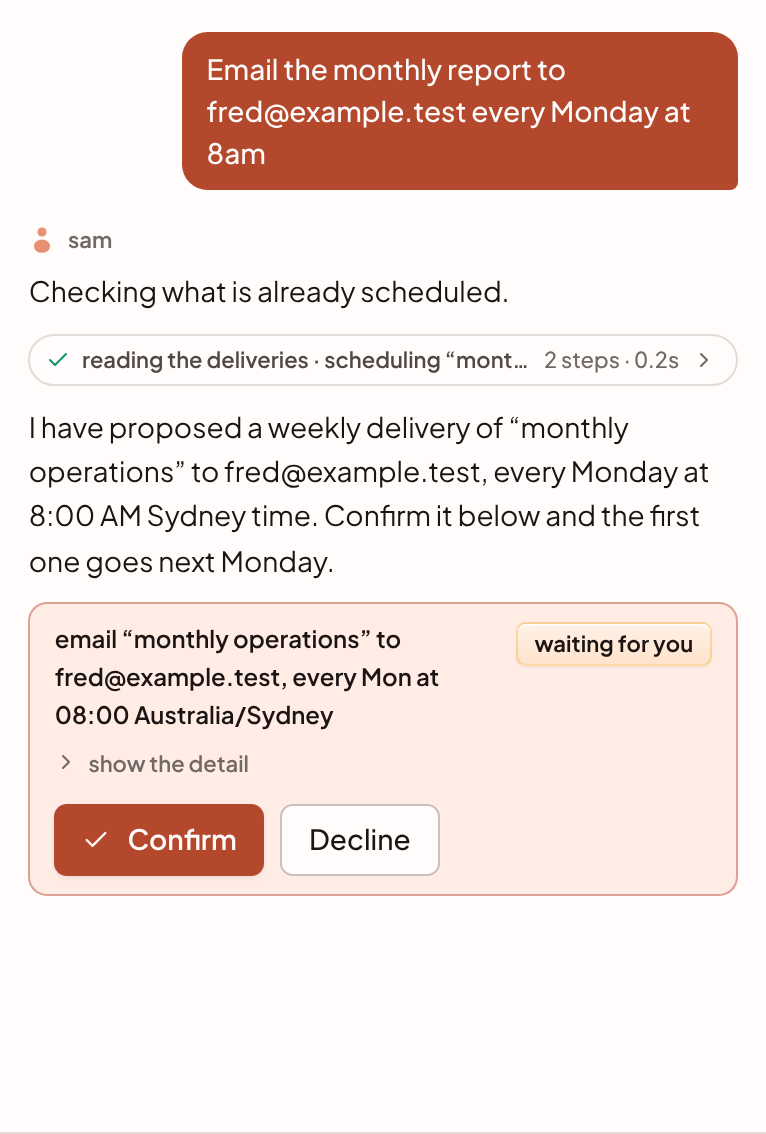
A change waiting for you sits at the foot of the conversation, under Sam's newest reply, wherever in the conversation Sam proposed it. It stays there, under any reply that comes after it, until you confirm or decline it. Then it goes back under the reply that proposed it, showing what happened.
The card appears as soon as Sam holds the change, while Sam may still be writing. Its buttons wait for the reply to finish, because the reply may hold more changes that Confirm all should run with it. Press the stop button to decide straight away.
Open show the detail on a card to see exactly what will run: the SQL of a view, or the full input of any other change. A view's card also has preview 50 rows, which runs the query against your data before you commit to building it.
- Read the card. Check the sentence and, if it matters, the detail.
- Press Confirm or Decline. Confirm runs the stored change once, as you, with your own role's permissions, so it is held to the same rules as the console's buttons. Decline discards it. Only your press runs a change: typing "yes, go ahead" in the conversation does not, and Sam points you to the card.
- Read the result. After Confirm, a line appears in the conversation, such as "confirmed · create view derived.revenue_by_month", and Sam says in a sentence what happened, then carries on with whatever was waiting on it. After Decline, the line reads "declined" and Sam does not reply.
A card is in one of six states: waiting for you, running, ran, failed, declined or expired. A change nobody decides on expires after 7 days, and you ask Sam again. Only the person whose conversation it is can confirm its changes.
If a confirmation is cut off on its way, such as when the connection drops, a note at the foot of the conversation says so and points you to the change's card, which shows where it stands. The note has no Try again, so a change is never sent twice. This is the same for Sam in the CRM.
Several changes at once
When Sam proposes several changes of one kind, such as six relationships, they come as one card with a row each. Each row has its own confirm and decline buttons, and the card has Confirm all and Decline all. When a reply is waiting on more than one kind of change, one bar under them all reads "N changes waiting for you" and confirms or declines every one.
Confirmed changes run one after another in the order Sam proposed them, which is the order they depend on each other: a table is accepted before the relationship that joins it. If one fails, the ones after it are not run, because they were built on it: each card says what it was waiting on, the line in the conversation reads some failed, and Sam proposes the corrected changes. Sam then answers once, about all of them, and carries on with the rest of what you asked.
Confirming the changes of one reply one at a time does not start a reply from Sam for each: a line says what ran, and Sam answers when you have decided the last of them. A change that ran has a link to what it made, such as open in modelling for a view or see the schedule for a delivery.
Autonomous
In Autonomous mode Sam defines things on the semantic model, builds views, schedules tasks, starts syncs and loads rows as soon as it decides to. Settings says what that means: a metric it defines is live at once, a view it builds runs on your compute and is billed to your workspace, and a sync it starts runs now. Nobody is asked first.
Choose it when you trust the people using Sam and want fewer interruptions. You can switch back to Ask first at any time.
What always asks
These ask for your confirmation in both modes, because they cannot be taken back, cannot be recalled, or commit you to a cost.
| Action | Why it asks |
|---|---|
| Take tables off the map | Every definition on the table goes with it |
| Delete a definition | It is gone for good |
| Drop a view or procedure | Its rows are gone |
| Remove a report delivery | The schedule is gone |
| Schedule, change or send an emailed report | A report in an inbox cannot be recalled |
| Approve a pull's connector | It agrees to the hosts the connector may reach with your credential, and only a person can agree to that |
| Start a pull | It runs on a schedule with your workspace's credential |
| Make or change a stream graph | It decides when your pushes write to other systems, and switches off the schedules its task and pushes kept of their own |
| Create summaries for a report | Each one is built again after every landing, on your compute, for as long as it is kept. The card says roughly how many rows it would keep |
| Drop a summary | Reports that read it read the whole table again |
What runs without asking
- Answering questions, and reading anything you can read.
- Creating a report, placing blocks on it and changing its filters and blocks. Every change is kept as a version you can restore from the report's history.
- Learn from my data, when you ask for it. It only files proposals, and nothing goes live until you accept them. It does use AI, so it counts towards your daily AI limit.
- Remembering a fact, searching your earlier conversations, and taking you to a page.
- Building a pull's connector: reading the app's documentation, writing the connector, and trying it with a credential you connected. A connector runs nothing until an owner or admin approves it, and a try lands nothing. See build a pull with Sam.
Everything else, in Ask first
Held in Ask first and run at once in Autonomous:
- putting tables on the map (which also draws the joins their column names state), and marking one as a fact or a dimension;
- defining a metric, dimension, filter, relationship, alias, category or dataset;
- accepting or rejecting a proposal;
- creating, replacing or rebuilding a view or procedure, and running a procedure;
- creating, running, pausing or resuming a scheduled task;
- applying warehouse tuning findings;
- starting a sync, and loading rows into the warehouse;
- pausing or resuming a report delivery.
Change the mode
Owners and admins set it under Settings · Sam, in the panel Sam · permissions, under Before it changes something. Members and viewers see the setting but cannot change it.

Below it, under What Sam may do, switches turn whole families of change on or off for everyone in the workspace: semantics, modelling, reports, data, sql and, where Sam can build a pull, streams. See what Sam can do.
What is recorded
- The conversation keeps every card in the state it reached, and a line for each confirmation, decline or failure. Reopen a thread tomorrow and it reads as it did today. Sam's reply is kept as it is written, so reloading the page while Sam works keeps what it had said and done and any change it was holding for you. The reload stops the reply, as the stop button does.
- The audit trail records changes to your workspace, including a change to these settings. When Sam acts for you it acts as you, with your role's permissions.
- Reports keep a version for each change Sam makes.
Connected AI assistants
This page is about Sam, inside the console. AI assistants you connect over MCP are a separate case, with their own approval queue on the Agents page. See MCP permissions.
Something unclear or out of date? Tell us, and we will fix the page.