Pull
Land a database's tables or an app's records in your warehouse, new and changed ones only. Postgres and Bite are ready to use; for another app, Sam writes the connector.
A pull lands records in your warehouse from another system: the orders in your shop's database, the sales from your point of sale, the bookings from your booking system, the jobs from your field service app. Each run reads only what is new or changed since the last, so a pull can run every few minutes and stay cheap.
You find pulls under Data · Streams · Pull, once Streams is switched on for your console. Until then the console doesn't list it. Pull was called Streams in for a short while in October 2026; only the name changed.
Your pulls, first on the page, lists each pull with its source, how many tables or resources it reads, when it runs, and its last run: how that run went, and the rows and data it read, which count up while a run is going. Its state is at the end of the row: scheduled when its schedule (or a sync or pull it runs after) starts it by itself, manual when only Run now does, or why it isn't running. Every row keeps the same columns, so the states and last runs line up. Press one to open it. Owners and admins have New pull at the right of the box. With no pulls yet, the box says None yet, and where the first one starts.
Two ways in
- A Postgres database or a Bite store is read by a published source: code Sanda wrote and runs as its own, so there is nothing to approve. You connect the database or the store, choose what to read, and set a schedule. See stream a Postgres database and stream a Bite store. The other published sources work the same way. ServiceM8, Mitti (formerly SafetyCulture), Geotab and CallRail are in the catalogue on every console with Pull. Square, Salesforce, Simpro, AroFlo, Fergus, Google Ads and Meta Ads are there once Sanda switches each one on for your console.
- Any other app's API is read by a connector Sam writes for your workspace from the app's documentation, and an owner or admin approves. The rest of this section is about connectors.
Press New pull, at the right of Your pulls, for either: its first step is the catalogue below, where you choose the source. Once you are in an editor, Reads from switches between the published sources and your approved connectors if you change your mind.
Choose a source
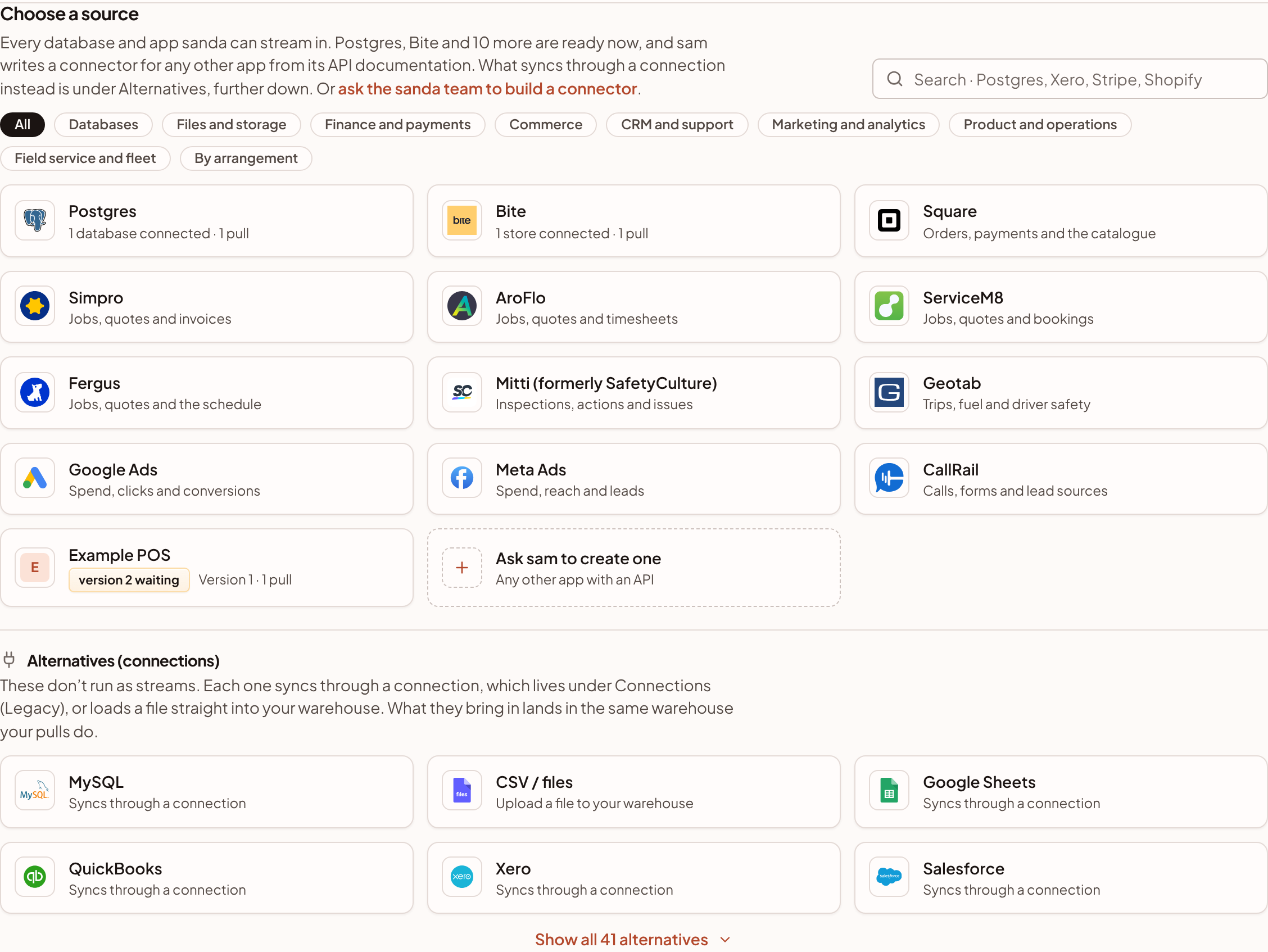
Choose a source, on Pull, is a catalogue of every database and app Sanda can bring in: one card each, with its logo and one line saying what it brings or how it comes in.
It is two lists. The sources that run as a pull come first: the published sources and your own connectors, then Ask Sam to create one, a card with a plus for any other app with an API. Below them, under Alternatives (connections), is everything that brings data in some other way: an app or database that syncs through a connection, and CSV, which loads a file straight into your warehouse. Those don't run as streams, and land in the same warehouse your pulls do.
| The card says | What it means | What pressing it does |
|---|---|---|
| A few words on what it brings, such as Tables from a database you run or Orders, payments and the catalogue | A published source with nothing connected yet: Postgres, Bite, or another source Sanda runs (see two ways in) | Opens New pull on it |
| 1 database connected · 2 pulls | A published source with something connected (databases for Postgres and Geotab, stores for Bite, accounts for Square, a build, a site, an account, a company or an organisation for the job and inspection apps, and the Google sign-in, Meta connection or CallRail API key a marketing source connects with), and pulls reading it | Opens New pull on it |
| Version 2 · 1 pull | A connector this workspace has, with the version its pulls run. No pull yet means none reads it, and no credential that none is connected | Opens New pull on that connector |
| waiting for approval | A connector nobody has approved yet | Opens the version, to read what it may touch, and for an owner or admin to approve it |
| Syncs through a connection | An app that signs in through OAuth rather than a key you can paste, an app the catalogue already has a ready-made connector for (Uptick, Mitti and CallRail), another database, or a file store. These come in through a connection on their own schedule: a connector's credential holds a key, never a sign-in, and an app with a ready-made connector needs no second one | Opens New connection on it |
| Upload a file to your warehouse | CSV | Opens upload a CSV |
| Ask Sam to create one · Any other app with an API | Any app the catalogue has no card for, such as Stripe, Shopify or HubSpot | Asks Sam, which asks you which app, then writes the connector from its API documentation |
Each list opens on the sources your workspace has and the popular apps; Show all N sources and Show all N alternatives list every one. Search by name or by family (type "finance" to see every finance app), or press a family to narrow the list: the search and the family narrow both lists at once. When only an alternative matches (search for "mysql"), the pull list says nothing streams from it yet and points you down to it, and, where Sam can write connectors, offers Ask Sam about the name so it can run as a pull instead. An app Sam would write a connector for has no card of its own, so searching for one ("stripe") finds nothing, and offers Ask Sam about the name you typed. A search that finds nothing at all does the same, because any app with an API can still come in.
To have the Sanda team build a connector instead, press ask the Sanda team to build a connector under Choose a source (or Ask the Sanda team to build it when a search finds nothing). It opens Support with the request already written, naming the app you searched for, and a few questions to answer. Nothing is sent until you press Send. See getting help.
Everyone can read the catalogue, and open a connector waiting for approval to read what it may touch. Every other press adds something on the workspace's behalf (a pull, a connection, an upload, a conversation with Sam), so only owners and admins can press those cards.
How a pull is made from an app
You don't write code. You ask Sam, and you approve what it built.
- Sam reads the app's API documentation. You name the app, and the address of its API reference. Sam reads only sites you named in the conversation, and the pages linked from them on the same site.
- Sam writes a connector. A connector says which addresses to ask for, how to read each answer, and how to find the next page. Sanda checks it before saving it: it must name the hosts it talks to, and it may only read.
- You connect a credential. Sam opens a form beside the conversation, and you paste the app's API key there. It never goes through the chat.
- Sam tries it. It reads the first pages of each thing the connector reads, with your credential, and lands nothing. You see the records, the columns they would become and every request.
- You approve it. An owner or admin reads what the connector may touch (its hosts, and what it may do there) and approves it. Then Sam asks to start the pull, on the schedule you want.
See build a pull with Sam for the whole conversation, and approve a connector for what approving means.
What a connector can and cannot do
A connector is code Sam wrote from documentation, so Sanda treats it as code it cannot trust and gives it nothing to misuse:
- It has no network of its own. It returns each request as a description, and Sanda makes the request.
- It talks only to the hosts it declared, and that an owner approved. A request anywhere else is refused before it is sent, and so is a redirect that leads anywhere else. Hosts that accept data from anybody, such as request catchers and tunnels, are refused outright.
- It only reads. It may send GET requests, and POST only to the search addresses it declared, for the APIs whose searches are a POST.
- It never sees your credential. Sanda attaches the credential to each request itself, and only to requests for the hosts it was connected for.
- It has no database. It hands records back, and Sanda lands them.
- It is paced. At most 20 requests a second, and fewer when the connector says the API wants fewer. When the API asks Sanda to slow down, it does.
Where the records land
Each thing a pull reads (a resource, such as sales or customers) lands as a table of its own in your warehouse's raw schema, named after the pull and the resource: a pull called "pos" reading sales lands in raw.pos__sales.
- One row per record, found by the record's key, so a record read twice is still one row.
- A column per field. Each field of the record becomes a column, typed by what its values are: numbers, dates, times with their zone, true or false, text, or JSON for a nested object or list. A string of digits, such as an account number or a postcode, stays text.
- New fields become new columns when they first arrive with a value, up to 200 columns. A column is never retyped or dropped, so a view built on it keeps working.
- The whole record is kept in
_record, as the API sent it. When a value no longer fits its column (text in a number column, a date that doesn't exist), the column is empty for that row and the value is still in_record. The run says how many values didn't fit. _synced_atis when the row last changed, and_deleted_atis set when a full read no longer finds the record. Nothing is ever deleted: the row stays in therawtable, and questions, reports and Sam's answers over the semantic model leave it out. If the record comes back, so does the row.- Each write is logged by the
sanda_write_logtrigger every landing table carries: which table was written to and when, never what. A new resource's table gets the trigger at the end of its first run. See triggers Sanda adds.
The tables are landing tables like a connection's, so you put them on your semantic map the same way, and Learn from my data reads them with the rest of your warehouse.
New and changed records only
A resource is read one of two ways. A connector declares which, and for a Postgres table you choose (how each table is read):
| Read | What a run reads | When a record disappears |
|---|---|---|
| New and changed | Records updated since the last run, by a field such as updated_at. Each run starts a little before the newest record the last one saw, so a record updated while the last run was reading is not missed |
It keeps its row: the API never says it went |
| Every record | The whole resource, every run. For small lists, such as locations or staff | Its row is marked _deleted_at and answers leave it out |
Either way, a record that has not changed since Sanda last landed it is neither rewritten nor counted.
A large first load is several runs. One run lands at most 20,000,000 records, and the next run carries on from the page the last one reached.
Load everything again
Load everything again, on a pull's page, makes the next run read every record from the start, as its first run did. Records already landed are only counted again if they changed. Use it when an app changed records in a way it doesn't report as an update.
What runs when it lands
A pull's page has When it lands: the stream graphs its landing starts, each linked to its page, and any push that runs straight after it with no graph between. Such a push sends the rows as they landed, before anything is rebuilt, and Rebuild first, in a stream graph beside it starts a graph of the pull and that push, for owners and admins. New stream graph starts one on the pull.
The pull's schedule is the one clock for everything after it: a task or a push in one of its graphs keeps no schedule of its own, and runs when the pull lands rows.
When something goes wrong
A run of a published source can pass over one thing it isn't allowed to read, such as a list the user who connected a Simpro build can't see. It reads everything else, says what it passed over and why in a note under the run's sentence, and doesn't count as failed. The Overview lists the stream under Needs attention, as stopped early, while its last run has a note. Each source's page says what its notes mean and what to do about them: see stream a Simpro build.
Credentials
A pull signs in with a credential an owner or admin connected for its connector: an API key, a username and password, or a key the app sends in a header. Sanda checks it with the app before keeping it, keeps it encrypted, and sends it only to the hosts it was connected for, which are fixed when it is connected. It is never shown again, in the console or to Sam.
Connected, at the foot of Pull, lists every connector your workspace has, and Postgres once a database is connected to it. A first credential is connected with Connect beside the connector there, in New pull on the connector (Connect one), or on the connector's page (What it may touch beside the connector opens it, or Review the waiting version while a version waits). Each credential is listed under its connector, so you can tell them apart by the last characters of a key, or by the username a password goes with, and Connect adds another. Type it again replaces the value (after you rotate a key at the app), and Disconnect forgets it. A stream whose credential the app stops accepting waits, rather than failing again and again, until someone types it again. A Postgres database's username and password are listed the same way, under Postgres in Connected, with Sign in again in place of Type it again. A Bite store is listed under Bite once one is connected, with Connect again, which goes through Bite's own sign-in (see stream a Bite store). A key or sign-in typed for a source that has since been switched off for your console stays listed under that source, tagged switched off, with Disconnect alone: it can't be connected or typed again while the source is off, but Sanda forgets it whenever you ask. The overview lists a credential that needs typing again under Needs attention. A Snowflake account connected for a push is listed on Push, not here, even though Pull has a Snowflake card of its own, and so is a Postgres database connected for a push: the database a Postgres pull reads is connected on its own, under Postgres here.
If somebody pastes a key into Sam's chat anyway, Sanda takes it out of the message before it is kept or answered, and says so. If it was a real key, change it at the app.
- Stream a Bite storeA store's customers, orders and loyalty, with nothing to approve.
- Stream a Square accountOrders, item sales, payments, refunds, the catalogue and timecards, through Square's own sign-in.
- Stream a Salesforce orgAccounts, contacts, leads, opportunities, cases, activities, campaigns, products and quotes, every field included, through Salesforce's own sign-in.
- Stream a Simpro buildJobs, quotes, leads, invoices, schedules and job costs, through Simpro's own sign-in.
- Stream an AroFlo siteJobs, quotes, invoices, timesheets and job costs, read with the site's own API keys.
- Stream a ServiceM8 accountJobs, invoice lines, payments, bookings and staff time, read with an API key.
- Stream a Fergus companyJobs, quotes, invoices, timesheets and schedule, read with a personal access token.
- Mitti (formerly SafetyCulture)Inspections, answers, actions, issues and schedules, read with an API token.
- Stream a Geotab databaseA fleet's trips, rule breaches and fuel, with the vehicles they belong to.
- Stream a Google Ads accountSpend, clicks and conversions by day, with calls and Local Services leads.
- Stream a Meta ad accountSpend, clicks and leads by day, with campaigns, ads and lead form enquiries.
- Stream a CallRail accountCalls, form submissions and texts, with the source and campaign of each.
- Build a pull with SamThe conversation, from the app's name to a running pull.
- Approve a connectorWhat you are agreeing to, and what changes when a connector is fixed.
- RunsWhat each run did, and what to do when one fails.
Something unclear or out of date? Tell us, and we will fix the page.