Ask questions
How to ask Sam well, what a reply contains, how to follow up, and how to have Sam take you to a page.
You ask Sam in plain words, in the box at the foot of the pane, the Sam chat page or the overview. Press Enter to send and Shift Enter for a new line. A message can be up to 8,000 characters. What you have typed and not sent is kept for that conversation in your browser, so a half-written question survives a look at another page.
While Sam works you can keep typing: press Enter and your message waits above the box, marked sends when Sam finishes, and goes as soon as the reply ends. cancel takes it back. Opening another conversation while Sam works does not stop the reply, which carries on and is there when you come back.
You can also press the stop button. It keeps what it had written so far, and the reply is marked stopped. Reloading or closing the page stops the reply the same way, and keeps what it had said and done, including any change it was holding for you. A reply cut short by a fault on Sanda's side is marked interrupted.
Ask well
Sam answers from the metrics and dimensions on your semantic model, so the closer your question is to how your team names things, the fewer steps it needs. It also matches synonyms and descriptions, so "debtors" will find a metric filed as "receivables" if that word is on it.
- Name the measure and the period. "Revenue for last quarter" beats "how are we doing".
- Say what to compare against. "Against the same months last year" gives Sam a second query to run.
- Say what you want back. A single figure, a table, a chart in the reply, a chart on a report, or a paragraph you can paste.
- Point at the thing. On a report, "this report" means the one open in front of you. Otherwise give its name.
- Ask it to build in the same breath. Sam acts on the first ask. It does not stop to ask whether to go ahead, and it does every step the ask needs, holding any change for your confirmation. For a report it needs a name and what the report is for, and asks for whichever is missing in one short question.
| You want | You could ask |
|---|---|
| A comparison | What changed in the numbers this month compared with last month? Lead with the biggest movements. |
| A breakdown | Show revenue by region for the last 6 months, as a table. |
| A chart | Chart net sales by category for the last 7 days against the previous 7 days. |
| A finding in text | Which invoices mention water damage, and what do they add up to? |
| A definition | Define a metric called net revenue as the invoice total less discounts. |
| A report | Build a monthly management pack: headline tiles, the trends and a short analysis. |
| A change to a report | Put the weekly sales report on the last 7 days. |
| How Sanda works | How do I invite a member? What does Standard include? |
| A page | Take me to the review queue. |
| A delivery | Email the June board pack to finance@example.com every Monday at 8am Sydney time. |
Some of these ask you to confirm before anything changes. See actions and approvals.
What a reply contains
A reply is everything Sam said, in the order it said it, with the work it did between the sentences.
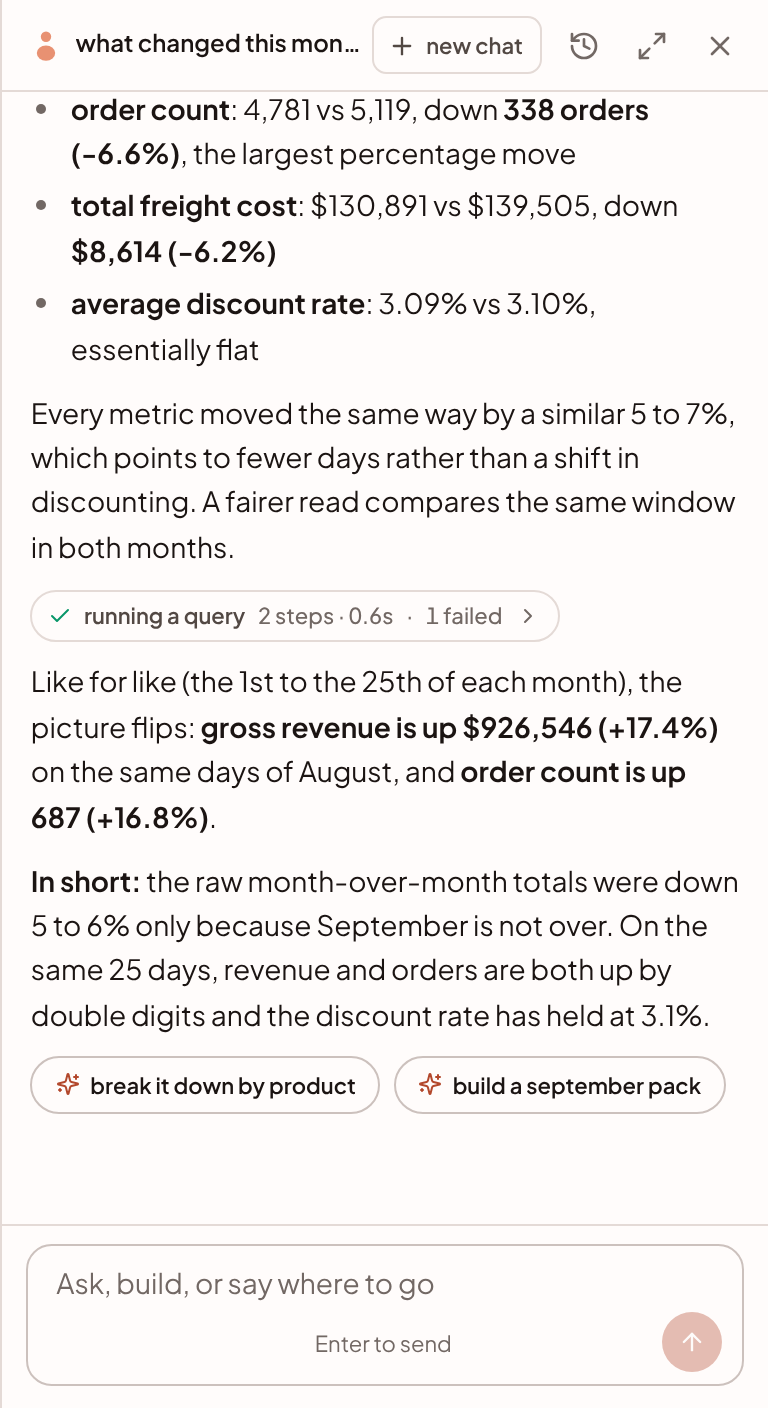
- Words and steps. Sam's words appear as it writes them. Each group of steps is one line: what Sam did, how many steps, how long, and a count of any that failed. While a step runs, the line names it beside a spinner. Open the line to see each step.
- Tables and charts. When the answer is a list or a breakdown, such as a top ten or a split by category, Sam writes it into the reply as a table. Ask for a chart, a graph or a trend and Sam draws one under its words: a bar chart for a ranking, columns for a total each period, a line or an area for a number over dates, or a donut for a share of a whole. Each chart is drawn from the rows of the query just before it, so a reply that compares two periods can draw both. A reply draws at most four charts. The chart stays with the reply, so it reads the same when you open the conversation again. To keep a chart that updates, ask for a report.
- SQL and rows. Under the reply, SQL and rows opens the statement behind the answer and the rows it returned. If there were more rows than are shown, it says how many it is showing out of how many. A query Sam runs for you returns at most 50 rows, so for a longer list ask for a top ten, or ask for a report.
- Cards for what it made or proposed: a report ("created the report") with open the report and, when the report has filters, a line saying what every block is filtered by; a view with open in modelling; what learn from my data found with review the suggestions; and any change waiting for your confirmation, which sits at the foot of the conversation until you decide it.
- A "took you to" link when Sam moved you to a page.
- Buttons. When your ask could mean two things, Sam offers the options as buttons and your choice is sent as your next message. At the end of a reply it may offer two to four suggested next questions.
- A foot line with copy, ask again, the model that wrote the reply and its cost. It stays under the latest reply, and shows under an earlier one when you point at it.
The figure under a reply is what the reply cost as billed, in Australian dollars. It counts towards the daily AI limit. See models and AI usage. Sam in the CRM shows no figure, because a CRM's Premium licences include Sam and it is never billed per use (see Sam in the CRM).
Follow up
Sam reads the recent part of the conversation (the last 24 messages), so you can say "the same for June", "now by product" or "why is that down". Pressing one of the suggested questions asks it for you.
You can change your mind about the last thing you sent:
- Edit and send again. Press the pencil beside your last message, change it, and press Send again.
- Ask again. Press the circular arrow under Sam's last reply to have it answer the same question afresh.
Both cut the conversation at that message. Everything after it is removed, including any change still waiting for your confirmation on a removed reply.
Ask it to take you somewhere
Say where you want to go: "take me to the review queue", "open the June board pack", "where do I add a connection". Sam opens the page and the conversation goes with you. On a desktop the pane opens beside the page and stays open. On a phone the page is shown and the Sam button carries a dot when the reply is in.
Sam can take you to these pages: Overview, Warehouse, Connections (including the new connection wizard and the CSV upload), Explorer, Modelling, Semantic model, Vector search, Agents, Reports, Sam chat, Pipeline, Settings and Support. It does not take you anywhere you did not ask to go.
How Sanda works
Ask "how do I connect Xero", "what is a sync mode" or "what does my plan include" and Sam searches these docs, answers from the page it finds and gives you the link. Its steps line reads "reading the docs on" and your words. It does not use the docs for questions about your own numbers, and it adds no AI cost of its own beyond the reply.
Searching text
If your workspace has a search index, ask about wording: "which tickets sound like this one", "what do the notes say about the Ferndale site". Sam searches the index and gets back rows, never a total. To count or total them it takes the keys from the hits and runs a query on those. See search your records.
Dates
When you name a period such as "last month", Sam works it out in your workspace's reporting time zone, the same days a report's filter means, and the query result carries the dates it used. If the exact days matter, give the dates. See filters and date ranges.
When Sam stops early
A reply has room for up to 16 rounds of work and about three minutes, a little longer while learn from my data runs. If it runs out, Sam says so and offers a carry on button, and the next reply picks up from what is already built rather than building it again. It also stops, and says why, when the workspace has reached its daily AI limit or a trial's free credit has run out.
If an answer looks wrong
- Open SQL and rows and read the statement.
- Check the metric it named. If it used a column instead of a metric, the answer rests on a column name and not on an agreed definition. Define the metric and ask again.
- Ask Sam why. "Which metric did you use for that, and what is its definition?" is a fair question.
- Press Ask again, or edit your question to be more specific.
Something unclear or out of date? Tell us, and we will fix the page.