Modelling
Turn landed tables into cleaned, joined and rolled-up views that the semantic fluid is built on, drafted with cherry, previewed live and kept fresh by tasks.
Modelling is the layer between what lands in your warehouse and what it means. Connections bring tables in exactly as the source system shaped them. Modelling is where you clean, join and roll them up into the tables the semantic fluid should be built on, and where you keep them up to date.
Everything you build here lives in the derived schema of one warehouse. It is yours: sanda reads raw for you, and writes derived only when you ask it to.
Go to Data · Modelling. Only owners and admins can build; every member can open the page and read what is there, because building costs compute.
The three tabs
| Tab | What it holds | Read more |
|---|---|---|
| Views | Views, which run their query every time they are read, and materialized views, which store their rows and are rebuilt on refresh. | Views and modelled tables |
| Procedures | Named blocks of SQL you can run with arguments, for work that is more than one query. | Procedures |
| Tasks | Ordered lists of refreshes and procedure calls that run on a schedule, after a sync, or when you press Run now. | Tasks |
A Warehouse menu at the top right chooses which of your warehouses you are working in. The sanda sample dataset is listed there as read-only, and you cannot build on it. Each tab has a list on the left, a search box, and a + button to make something new. Select an item to see it on the right.
Four ways to start a view
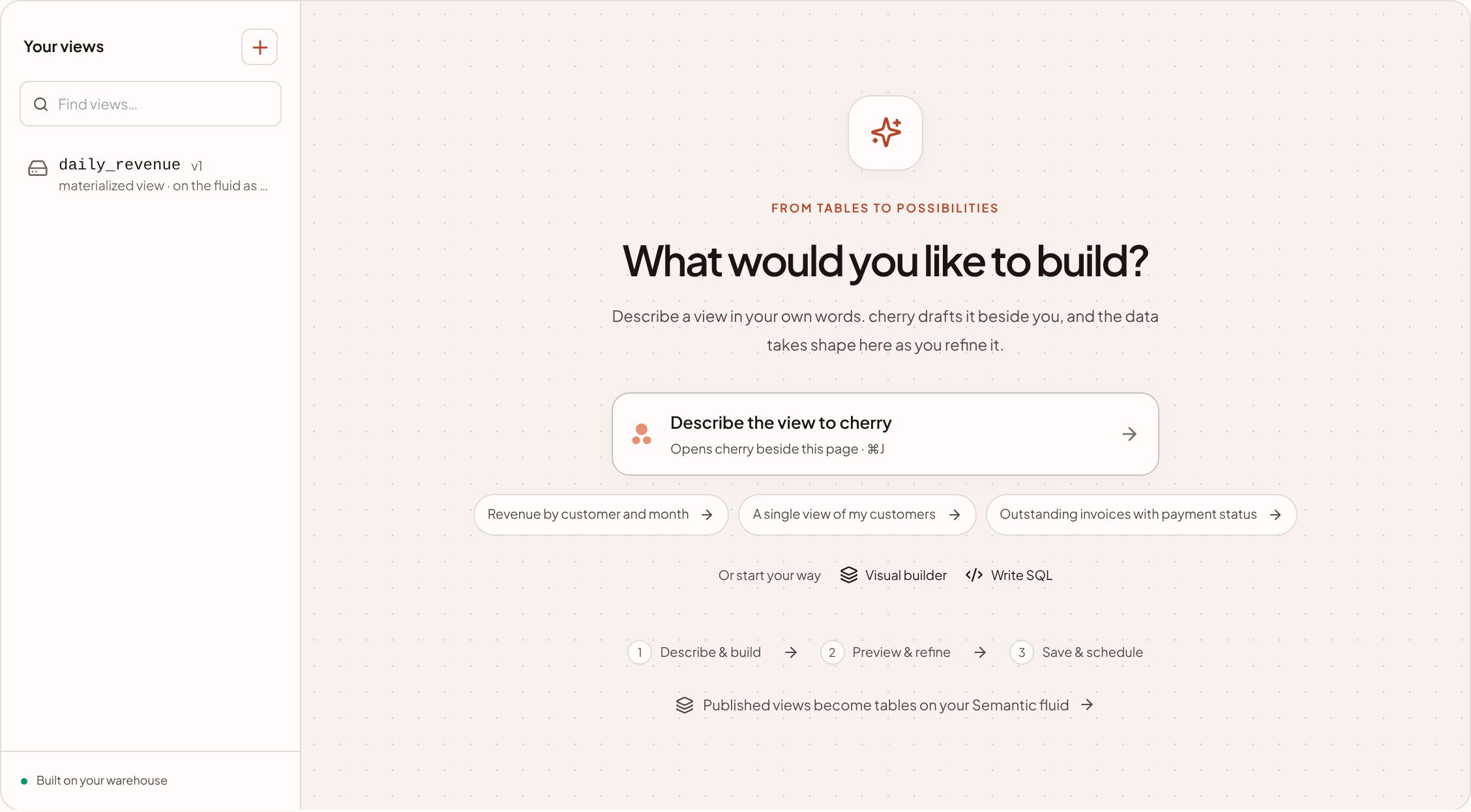
- Describe it to cherry. Press Describe the view to cherry (or ⌘ J) and say what you want in your own words, or pick one of the examples, such as Revenue by customer and month. cherry opens beside the page, reads the names and types of the tables and columns in the warehouse, and drafts a view for you.
- Draw it. Visual builder lets you start from a table, join others, drag columns into the output and wrap them in functions, without typing SQL.
- Write it. Write SQL gives you a box for a
selectand a live preview. - Save it from the workbench. In the semantic fluid's query workbench, save as view keeps the selection of metrics, dimensions and filters that just ran as a view. It appears here marked saved from a query. The first three are on the welcome screen of the Views tab.
All four make the same thing: a view in derived, with a name, a definition and a version history.
Build with AI
To draft a view, cherry is given the relations in the warehouse and the names and types of their columns. What it produces is a draft you can read.
- Depending on how you ask, cherry either fills the builder with a draft for you to edit, preview and save, or saves the view itself. When it saves one, Modelling says so, for example cherry saved daily_revenue. It is on the semantic fluid.
- A draft has to pass the same checks as one you wrote: a valid name and a single read-only
select. If cherry cannot write one, it tells you what it needs to know. - Building with AI needs something to build on. In a warehouse with no landed tables, sanda asks you to connect a source first.
- Only owners and admins can build. See cherry actions and approvals for when cherry asks before it acts.
Ask cherry for the next change from the Ask cherry button in the builder, or Edit with cherry on an existing view.
Live previews
You see the data as you shape it.
- In the builder that the + button opens, Live preview re-runs your query a moment after you stop typing and shows the first 50 rows, with a Columns tab for the shape. Untick it to pause, and press the play button beside it to run once.
- In Write SQL, press Preview 50 rows. In the Visual builder, press preview 50 rows.
- A preview reads your warehouse in a read-only transaction and stops after 20 seconds. Values are cut at 300 characters.
- For a procedure, the preview shows read-only source data. The procedure has not run, and the rows are not a simulation of its output.
Every object says what it affects
Before you touch a modelled table, Modelling answers "who is standing on this?". Each object lists:
- the semantic fluid table it is published as, and how many metrics, dimensions and filters are defined on it;
- the other
derivedobjects whose SQL reads it; - the tasks that rebuild or call it.
Drop and Redefine are checked against the same information.
What Modelling protects you from
- Built on a published table. A view cannot read a
mappingview that the fluid publishes, because the fluid replaces those whenever a table's columns change. Read the table behind it instead. The builder does not offer published views as sources. - Dropping something in use. Dropping a view or materialized view is refused while another object reads it, and so is a redefinition that needs it dropped and recreated. sanda names the dependents and never cascades.
- Name clashes. A new name cannot match a landing table or a published view.
The SQL shell does not protect you in these ways, and that is why it opens on a warning.
Cost
Views cost nothing until they are read. Materialized view builds, procedure calls and task runs are billed as compute for the seconds they run. Every one is recorded with its duration and cost. See Usage, budgets and suspension.
Something unclear or out of date? Tell us, and we will fix the page.