Invoices
When Sanda invoices you, what each line means, how GST appears on a tax invoice, where to find your invoices, how account credit pays them, and how to pay.
Sanda invoices monthly in arrears, in AUD. Each invoice covers a period that has just ended, normally a calendar month, and lists the platform fee and each meter as its own line.
Where to find your invoices
Sanda emails each invoice to your workspace's owners and admins, and the email is the invoice. It carries every line and the total.
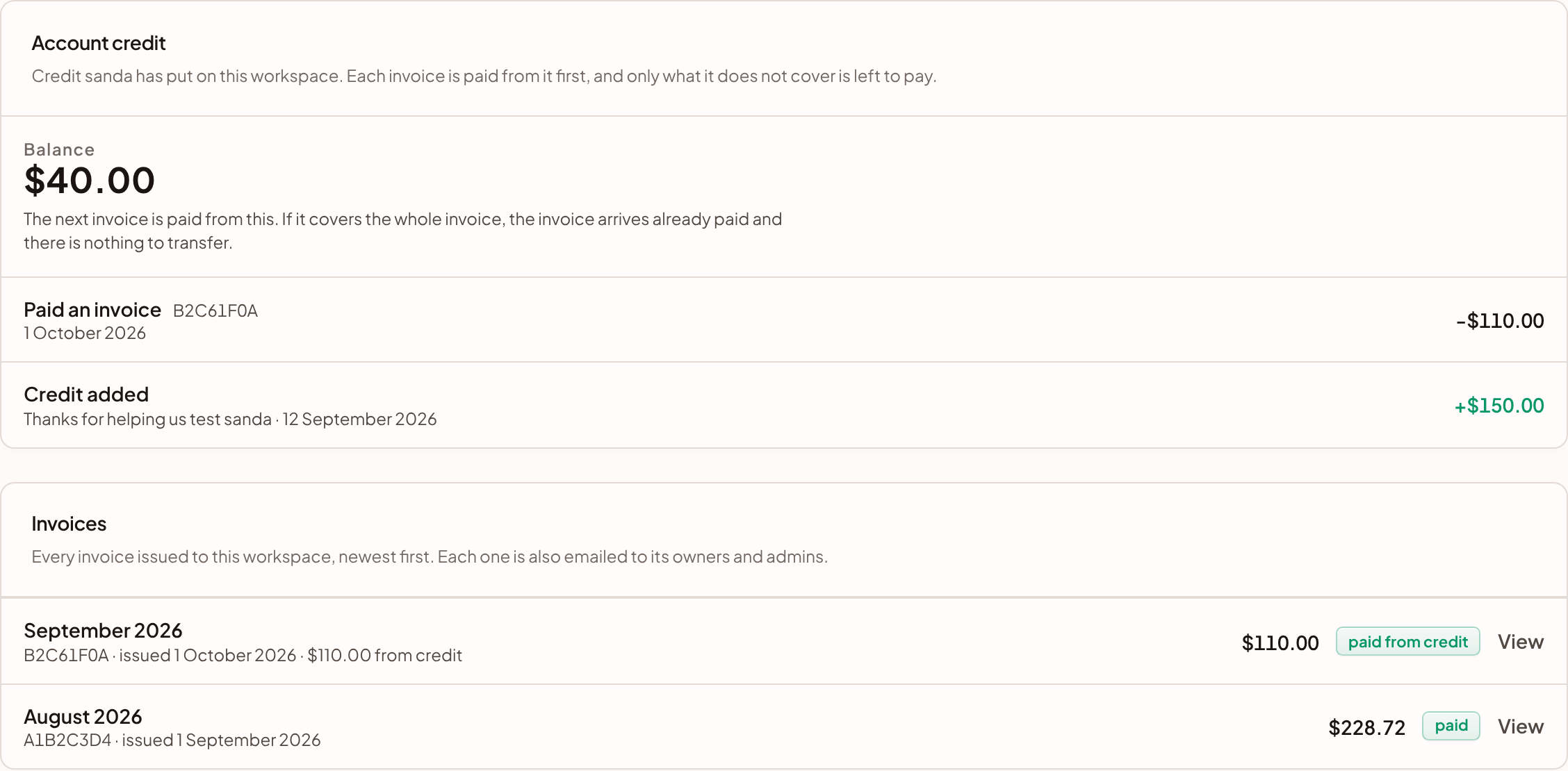
Every invoice issued to the workspace is also under Settings · Billing, newest first, with its period, reference, date of issue, total and whether it is paid. View opens the invoice itself, the same document that was emailed, and Print or save as PDF prints it on its own, ready for your records. Only owners and admins can see them.
If a bookkeeper or a finance inbox should receive them too, ask Sanda support to add the address.
Invoices are paid by bank transfer, after any account credit has paid its part (see account credit). Sanda does not take card payments, so it never holds card details. The bank details and payment terms are printed at the foot of each invoice, and the invoice has a Reference to quote when you pay. Sanda keeps invoices for at least five years, as Australian tax law requires.
A trial pays nothing, so there is nothing to pay. See Free trial.
What is on an invoice
An invoice shows who it is from, with Sanda's ABN, and who it is for. It shows the period, the date it was issued and the reference, then the lines, then the total.
| Line | What it is | Unit |
|---|---|---|
| Sanda platform · your edition | The flat platform fee. A part month says how many days it covers | Month, or day |
| Sanda CRM · your plan's licences | The CRM's licences, by the days each was held after the CRM's free trial, once it is upgraded. A period that spent days on each plan has a line for each, Standard licences and Premium licences, each at its own price | Licence month |
| Warehouse storage | The data your warehouses held, integrated over the period | GB-month |
| Warehouse compute · your edition | Compute, metered by the hour | Compute hour |
| Managed sync runs | Each successful run | Run |
| Streams · rows moved, rows included | The rows your streams moved, and the ones your edition included. Only the rows past the included ones are charged | Million rows |
| Stream runs | Each run of a stream that did its work. A failed or skipped run is not counted | Run |
| AI | One line for each model used, with its name | Million tokens |
Lines you may also see:
- Lines Sanda adds by hand, such as how-to support hours on Basic and Standard, billed at A$150 an hour, or a discount.
- An "included" AI line. On invoices for periods before Sanda began billing its own work on your data, that work appears at no charge, marked "included".
- A line at zero. A meter with nothing on it in the period can still appear, at zero.
Under the total, an invoice that account credit paid shows Paid from account credit and then Amount due, which is what is left to transfer.
The platform fee comes first, then the CRM's licences, so you meet the flat parts before the metered part. A CRM on its own has only its licence lines: its warehouse is Sanda's to run and never on its invoice, and Sam in the CRM is included in its Premium licences. For how each meter is measured, see Usage and metering.
The usage lines are priced with the same arithmetic as This month so far under Settings · Plan & budget, so nothing on an invoice should be a surprise. For the platform fee and part months, see How billing works.
Account credit
Sanda can put credit on your workspace. Every invoice the workspace is issued is paid from that credit first, at the moment Sanda issues it.
- When the credit covers the whole invoice, the invoice arrives already paid. Its foot says "Paid in full from account credit. There is nothing to transfer."
- When it covers part, the invoice shows the total, then Paid from account credit, then Amount due. Transfer the amount due as you would any invoice.
- The total does not change, and neither does the GST on it. Credit is how the invoice is paid, not a discount on it.
- If Sanda voids an invoice that credit paid, that credit goes back to your balance.
Settings · Billing shows the balance and every movement of it under Account credit: credit added or taken back, with Sanda's note when there is one, and each invoice it paid, by reference. Only owners and admins can see it.
Credit is added by Sanda. You cannot buy or top it up from the console. It is not the same as the free trial credit, which measures what a trial uses, and a trial is never invoiced, so credit on a trial waits for the workspace's first invoice.
Tax invoices and GST
An invoice from Sanda is one of two documents, and its heading says which.
- Tax invoice. When Sanda is registered for GST at the time it issues the invoice, the document says Tax invoice, shows Sanda's ABN, shows the subtotal, and shows GST as its own line with its rate. The total is labelled as including GST. The GST line is printed even when it is nothing.
- Invoice. When Sanda is not registered for GST, the document says Invoice, has no GST line, and says in words that no GST has been charged and that Sanda is not registered. It still carries Sanda's ABN.
The kind is fixed when the invoice is issued. A document keeps the heading it was sent with, whatever Sanda does afterwards. Read the heading on your own invoice to see which applies.
If an invoice looks wrong
Ask before you pay. Questions about billing are free on every edition. Write to Sanda support at hello@sanda-os.com.au with the invoice reference.
The terms say charges more than 14 days overdue suspend a workspace, and that suspension is not deletion. If you dispute a charge, say so early.
Something unclear or out of date? Tell us, and we will fix the page.