sanda sql
Run your own SQL directly on a warehouse. Read-only by default, capped, timed and recorded in the audit trail.
sanda sql is the SQL shell: a box where you type one PostgreSQL statement and run it on one of your warehouses. Use it for a question the Explorer cannot answer, a quick check on a landing table, or a one-off fix.
It is the one console page that opens on a warning rather than on its content. Modelling refuses to drop a view something depends on, and the Explorer cannot write at all. Here you are the parser: sanda runs what you type, and in read-write mode it cannot undo it.
Open the shell
Only owners and admins can open it, because what it runs costs compute and what it changes cannot be undone by sanda. Other members see a note saying so.
- Go to Data · Warehouse and press SQL shell on a healthy warehouse card. You can also press SQL shell on a warehouse's summary in the Explorer.
- Choose the warehouse from the warehouse menu at the top right if you have more than one. The menu shows each warehouse of your own. The sanda learning dataset is shared and read-only, so it is not offered.
If a warehouse is not healthy, the shell says so and opens once it is.
Read the warning
The first time you open the shell on a warehouse in a browser session, it shows For advanced users. Read this once before you open it. and nothing else.
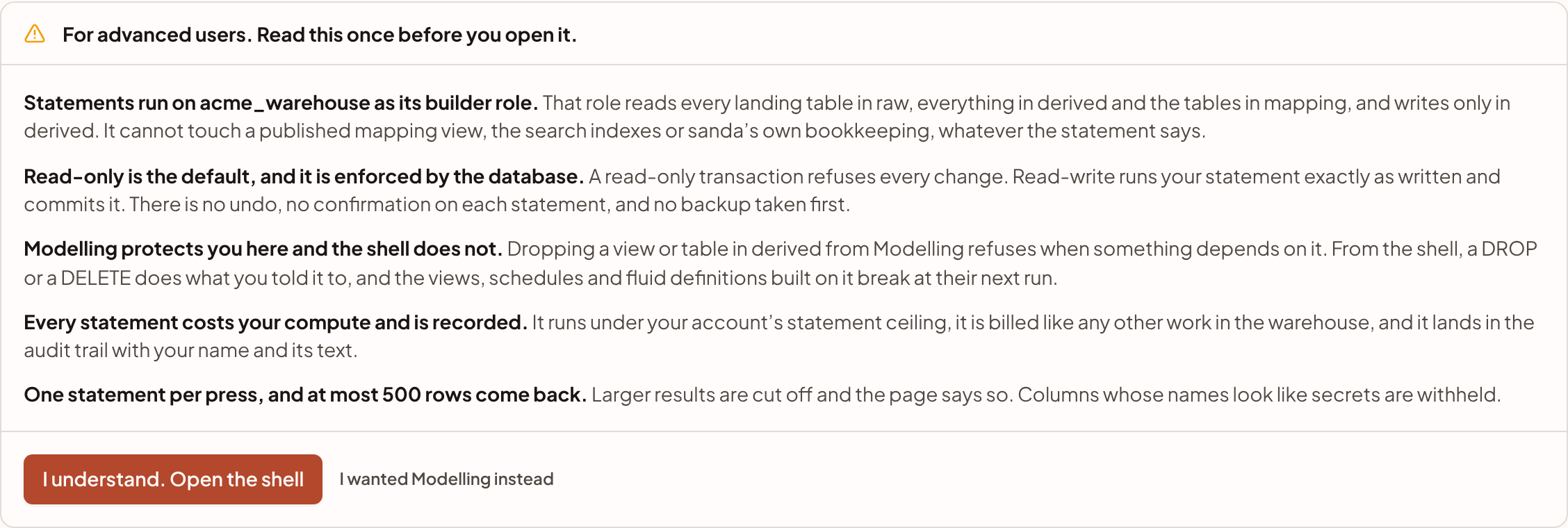
It makes five points, and each is a fact about how the shell works:
- Statements run as the warehouse's builder role. That role reads every landing table in
raw, everything inderivedand the tables inmapping, and writes only inderived. It cannot touch a publishedmappingview, the search indexes or sanda's own bookkeeping, whatever the statement says. - Read-only is the default, and the database enforces it. A read-only transaction refuses every change. Read-write runs your statement exactly as written and commits it. There is no undo, no confirmation on each statement, and no backup taken first.
- Modelling protects you here and the shell does not. From Modelling, dropping a view refuses when something depends on it. From the shell, a
dropor adeletedoes what you told it to, and the views, schedules and fluid definitions built on it break at their next run. - Every statement costs your compute and is recorded. It runs under your warehouse's statement ceiling, it is billed like any other work in the warehouse, and it lands in the audit trail with your name and its text.
- One statement per press, and at most 500 rows come back. Larger results are cut off and the page says so. Columns whose names look like secrets are withheld.
Press I understand. Open the shell to carry on, or I wanted Modelling instead to go to Modelling. sanda remembers that you accepted for this warehouse until you close the browser tab. Opening a different warehouse asks again, because the reach of a statement is a different database.
Run a statement
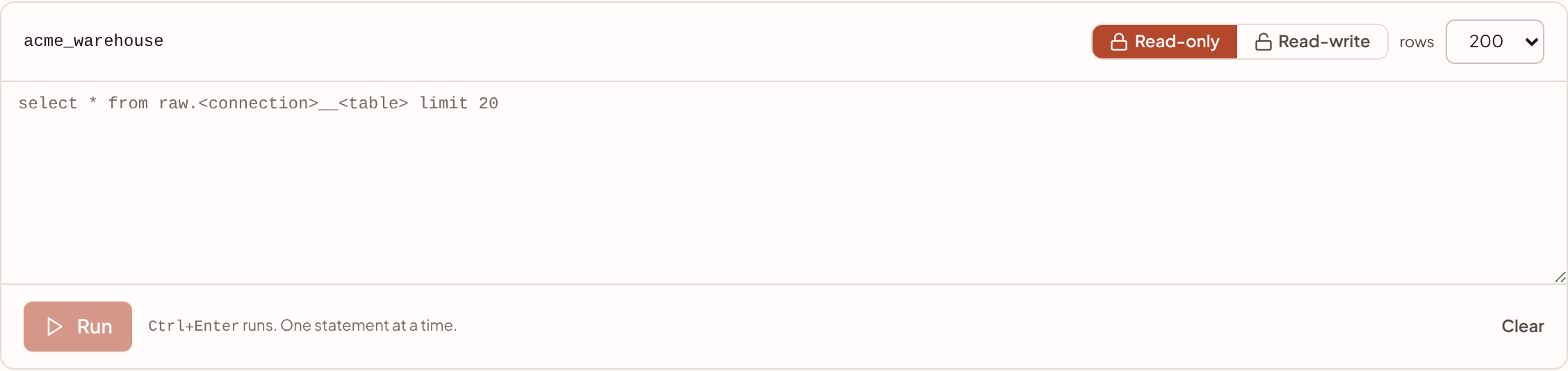
- Check the mode. The shell opens on Read-only. Leave it there unless you mean to change something.
- Choose how many rows. The rows menu offers 50, 200 (the default) and 500.
- Type one statement. Name tables with their schema, as the placeholder does:
select * from raw.<connection>__<table> limit 20. - Run it. Press Run, or Ctrl Enter (⌘ Enter on a Mac). Clear empties the editor.
- Read the result. A bar above the rows shows the mode (read-only or committed), how many rows and columns came back, how long it took, and the ceiling it ran under.
Read-only and read-write
| Read-only | Read-write | |
|---|---|---|
| How it runs | Inside a read-only transaction, so PostgreSQL refuses any change, including a writable with clause or a function with side effects |
Exactly as written, and committed as soon as it finishes |
| Run button | Run | Run and commit |
| Editor | Normal | Drawn in red, with a banner: Read-write. Each statement commits as soon as it finishes. There is no undo. |
| Undo | Not needed | None |
Switching to Read-write asks you to confirm. The page then stays in read-write until you switch back or leave it.
In read-write mode you can create and change objects in derived only. For example, to keep a rollup as a table:
create table derived.monthly_revenue as
select date_trunc('month', sale_date)::date as month, region, sum(revenue) as revenue
from raw.csv__sales
group by 1, 2;
An object you make this way is an ordinary table in derived. sanda does not record it as a modelled object: it has no versions, no history and no schedule, the Explorer marks it Made outside sanda, and sanda will not drop it for you. If you want a definition sanda keeps versioned and can rebuild on a schedule, build a view or materialized view in Modelling instead.
A statement that writes anywhere else fails with a permission error that names what the builder role may do.
What a statement can reach
| Can read | raw.*, derived.*, the tables in mapping.*, and the database catalogue (information_schema and pg_catalog). |
| Can write | derived.*, in read-write mode only. |
| Cannot reach | Views the semantic fluid publishes in mapping, sanda search's indexes, sanda's bookkeeping, and the managed sync's working area. |
Because published mapping views are out of reach, a shell statement cannot read the tables cherry and reports read. Read the landing table behind one instead, for example raw.xero__invoices rather than mapping.invoices.
Limits
| Limit | What happens |
|---|---|
| One statement per press | A second statement after a semicolon is refused with a sentence. A trailing semicolon, and comments after it, are fine. A semicolon inside a string, a quoted name, dollar-quoted text or a comment is just text. |
| 20,000 characters | Longer text is refused. |
| 500 rows back | The rows menu chooses 50, 200 or 500. A statement that returns rows is read through a cursor and stops one row past the cap, so a select * over millions of rows costs the warehouse only the cap. The result says Cut off at N rows. Add a LIMIT or a WHERE to see the rest. |
| Statement ceiling | Your warehouse's ceiling applies, which is at most 60 seconds on Basic, 60 seconds on Standard and 5 minutes on Enterprise. The shell never waits longer than 55 seconds, so a longer ceiling is lowered to 55 seconds here. A lower ceiling that you set under Limits is kept. |
| 300 characters a value | Longer values are cut with an ellipsis. |
| Secret-looking columns | A column whose name looks like a secret comes back with its values left empty, and the result says Withheld because the name looks like a secret and lists them. See the SQL reference for the words that trigger it. |
A statement that runs past its ceiling is stopped, with That ran past its time ceiling and was stopped.
Results
A statement that returns rows shows them in a table, with No rows. when there are none. A statement that changes something shows its command (for example INSERT or CREATE TABLE) and the number of rows it affected.
Values are shown as text: dates as ISO strings, JSON as JSON text. The shell has no download button. To take data out of sanda, see Take your data with you.
Below the results, This session lists your last 20 statements in this tab, newest first, each marked read, write or failed. Press one to put it back in the editor. The list lives in the tab only and is gone when you close it. The audit trail keeps every statement.
Cost and record
- Cost. A statement is billed like any other work in the warehouse, as compute. Heavy use of the shell therefore adds to your monthly spend and counts towards a budget. See Usage, budgets and suspension.
- Record. Each statement is written to the audit trail with your name, the mode, whether it succeeded, how long it took, how many rows it touched and its text (the first 500 characters of a long statement).
Agents can use it too
An assistant connected over MCP with the sql:write scope can run the same kind of statement with the execute_sql tool. It runs through the same path as the shell, with the same limits, and it must give a reason with each statement. If an owner or admin has asked for approval of risky actions, a read-write statement waits for a person to approve it. The audit trail marks the statement as coming from an agent and names the credential and the reason. See MCP tools, scopes and permissions and approvals.
Something unclear or out of date? Tell us, and we will fix the page.