Review what sanda proposes
Everything sanda proposes waits in one queue. Accept, correct or reject each suggestion, accept the lot, or ask cherry to do it.
sanda never writes its own guesses into your fluid. What it proposes from your data becomes a suggestion in a review queue, and only what you accept reaches an answer, a report or an AI assistant. That gate is what makes it safe to let sanda learn your data: the worst outcome is a queue of rejects, not a wrong number in a board pack.
Where suggestions wait
On the map, a suggestions chip appears at the top of the rail whenever something is waiting, with a count. Press it to open the queue, headed "N suggestions waiting on you". cherry opens the same queue when a learn pass has proposed something.
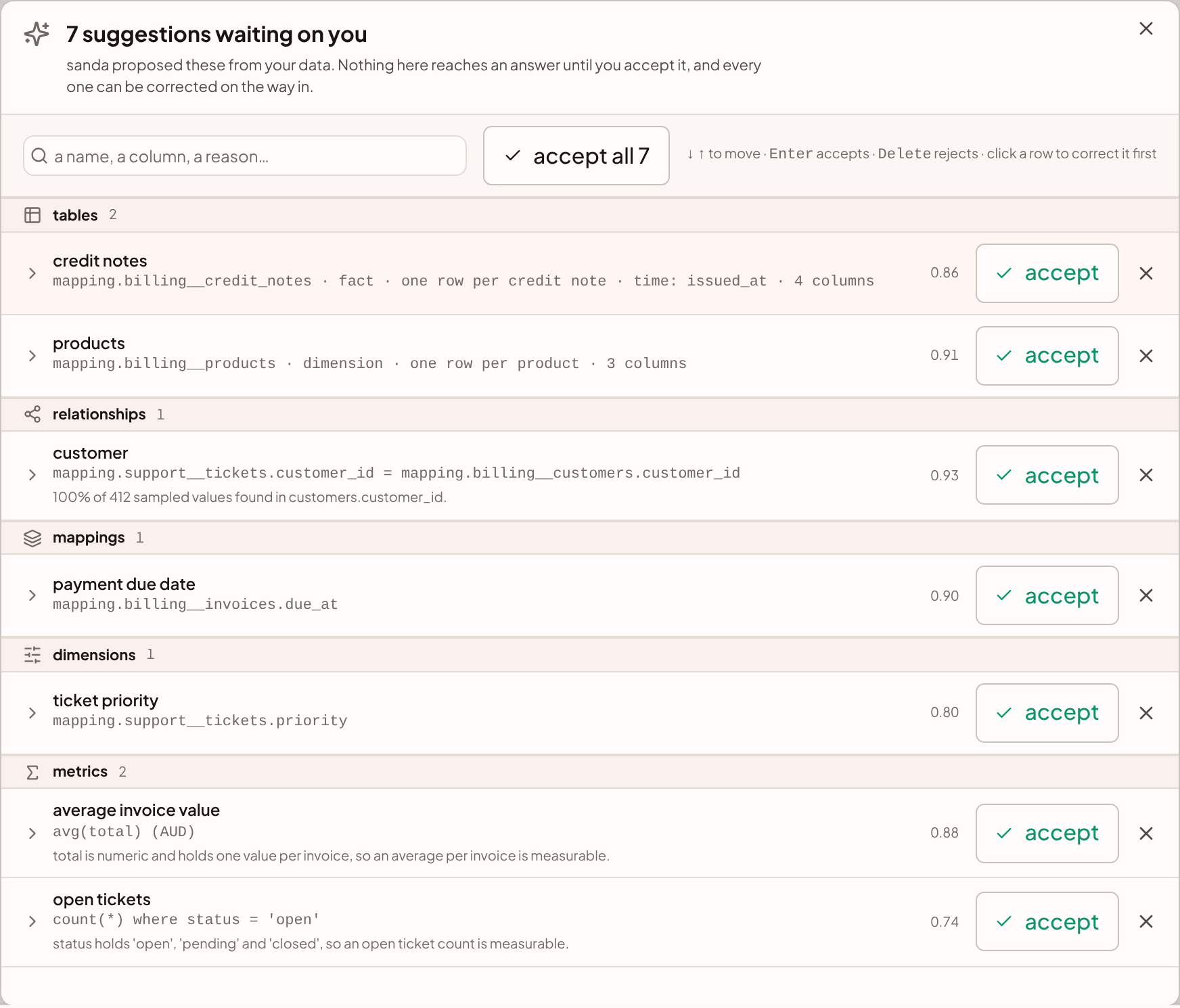
In the list view there is no rail. The same suggestions wait in a panel headed N waiting on you, with Edit, Accept and a reject button on each row.
A suggestion is in one of three states:
| State | What it means | Reaches answers |
|---|---|---|
| Waiting | sanda proposed it and you have not decided | No |
| Accepted | It is live in the fluid | Yes |
| Rejected | It is retired: kept, but out of the map and out of every answer | No |
What is in the queue
Suggestions are grouped by kind, in this order: tables, relationships, mappings (names and value labels), dimensions, metrics, filters and categories.
Each row shows the suggestion's name, a line saying what it is (a relation, a SQL expression, a pair of columns) and a confidence from 0 to 1, which is the AI's own estimate. For a metric or a relationship it also shows the reason: the column and values that made it possible, such as "100% of 412 sampled values found there". Read the reason. A suggestion whose reason you can check in a glance is one you can accept in a glance.
A relationship is one row, even though it is stored as one entry per table. Both sides are decided together, because half a relationship is a labelled column and no join.
Decide one suggestion
- Accept. Press accept. The suggestion goes live at once. An accepted table appears on the map as a card.
- Reject. Press the cross. The suggestion is retired. sanda does not propose it again under the same name.
- Correct, then accept. Press the row to open its form, change what is wrong, and press accept with these changes. This is the most common verdict: the metric you wanted, summing the wrong column. The correction and the acceptance happen in one step, so a wrong definition is never live, even briefly.
A correction faces the same checks as anything you type. A metric must still be one SQL fragment, and a name that already exists is refused with "You already have a metric by that name. Rename this one, or reject it and edit the one you have."
Correct a relationship
A relationship's form has three parts:
- Shared identity (join key), the name of the thing both columns hold, such as
customer. - Shown as, the words used to describe the join.
- For each table, whether it holds one row or many rows per value of the key.
At least one side has to hold one row. sanda does not join many to many, because a total across such a join is silently too large. See Relationships.
Work through the queue from the keyboard
↓ and ↑ (or J and K) move between suggestions. Enter accepts the highlighted one, and Delete rejects it. These stand down while you are typing in a form.
A decided suggestion leaves the list at once and the request settles behind it, so the panel does not shift under your pointer. If a decision fails, the suggestion returns with the reason.
Use the search box to narrow the queue by a name, a column or a reason.
Accept them all
Press accept all N. sanda asks once more with yes, accept all N and a reminder that every suggestion goes live and enters what the agent is told. You can still edit or delete them afterwards.
Several accepts run at once. Tables go through one at a time, so two new cards cannot land on the same spot. If some are refused, they stay in the list and the first reason is shown.
If you have typed in the search box, the button reads accept these N and accepts only what the search left showing.
When the queue is empty, the panel offers tidy the map, which arranges the cards by how they join, so you can check the relationships at a glance. After that, the natural next step is a first report. Ask cherry to build one.
Let cherry accept for you
Ask cherry in plain words: "accept the suggestions", or "accept the proposed tables and the relationships between them". cherry reads the queue, then accepts or rejects each item. It accepts the tables a relationship needs before the relationship, and it can pass a correction along with an accept.
What happens next depends on Before it changes something under Settings · cherry:
- Ask first (the default). Each change cherry proposes waits in the conversation as a card with Confirm and Decline. Several of one kind arrive as one card with a row each, and Confirm all N and Decline all at its foot.
- Autonomous. cherry accepts as soon as it decides to.
The semantics switch under the same settings decides whether cherry may review suggestions at all. See actions and approvals.
What to check before you accept
- Tables. Is it a fact or a dimension, and is the grain right? A wrong grain is how an invoice line gets counted as an invoice.
- Metrics. Read the SQL and the reason.
sum(total)is only revenue iftotalis what you mean by revenue. - Relationships. Check which end holds one row. Reversing it produces totals that are too large and look reasonable.
- The questions cherry could not settle. The currency, the start of your financial year, and whether a status code means what its name says are things only you can answer, and they are what make a number quietly wrong.
Something unclear or out of date? Tell us, and we will fix the page.