Push
Send whole tables into Salesforce, or write Sanda's agreed numbers onto your records. Each run sends only the records whose values changed.
A push writes Sanda's numbers into fields on your Salesforce records: revenue over the last twelve months on each Account, the overdue balance beside it, the date of the last order. Or it sends a whole table from your semantic model, such as sales by store and day, as an object of its own with one record a row (see send a whole table to Salesforce). The numbers come from your semantic model, so they mean what your team agreed they mean. They land in ordinary Salesforce fields, so Salesforce reports, list views, flows and page layouts read them like any other field.
Pushes are included on Standard and Enterprise, and during a trial. You find them in the console under Data · Streams · Push, once Streams is switched on for your console. Until then the console doesn't list it. Push was called Streams out for a short while in October 2026; only the name changed, and every push kept its runs and what it remembered of Salesforce.
How it works
your semantic model: a number per record, such as revenue or overdue balance
        |  read on each run, one row per Salesforce record
        v
compared with what Salesforce last accepted from Sanda
        |  only the records whose values changed
        v
the fields on those records in your Salesforce org- You connect a Salesforce org by signing in to Salesforce as the user Sanda writes as. See connect Salesforce.
- You define a push: a whole table into an object Sanda creates for it or one you have, or the Salesforce object, the field that finds each record, and the Sanda value written into each field. You preview what it would send before anything goes. See create a push.
- It runs on one of these: after a connection syncs, after a pull lands, on a schedule, or only when you press Run now. A push in a stream graph runs when the graph has modelled what its pull landed, on the pull's schedule and no other. Each run reads the values, formats them the way Salesforce stores them, and compares them with what Salesforce last accepted. A Salesforce date field takes a value's day in your workspace's reporting time zone, so a month the push groups by lands on its first day there. Only the records whose values changed are sent, and a run where nothing changed makes no call to Salesforce at all. See runs.
This is not the Salesforce connection under Data · Connections, which reads your Salesforce data into Sanda (see Salesforce). A push goes the other way, and it is set up separately. The two work well together: the Salesforce sync lands each record's Id in your warehouse, and a push uses it to find the record again.
The Push page
From the top:
- Your pushes, first on the page: each with the object it writes, how many fields, the org it writes to, when it runs, how its last run went and how many records it sent, and its state (scheduled when a schedule, a sync, a pull or a stream graph starts it, manual when only Run now does). The columns line up from one push to the next. Press one to open it. Owners and admins have New push at the right of the box once an account is connected. With no pushes yet, the box says None yet, and how the first one starts.
- Choose a destination: a card for each system a push can write to (below).
- Connected orgs, a button at the right of the Choose a destination heading once an org has been connected. It shows how many orgs are connected, and connect again when one needs connecting again. Pressing it opens a window of the Salesforce orgs your pushes write to, each on a row of columns (its name, the user Sanda signs in as and where, its state, when it was connected, and its buttons), with how many pushes write to it and how much of its daily API allowance was used at the last reading. In the window, Connect Salesforce and Connect a sandbox connect another org, Connect again connects one again, and Disconnect forgets one, with Salesforce's advice on who to sign in as under the orgs. Once a destination that calls its accounts something else is connected too (HubSpot's accounts, say), the button and the window say Connected accounts, and the window lists each destination's accounts under its name. See connect Salesforce.
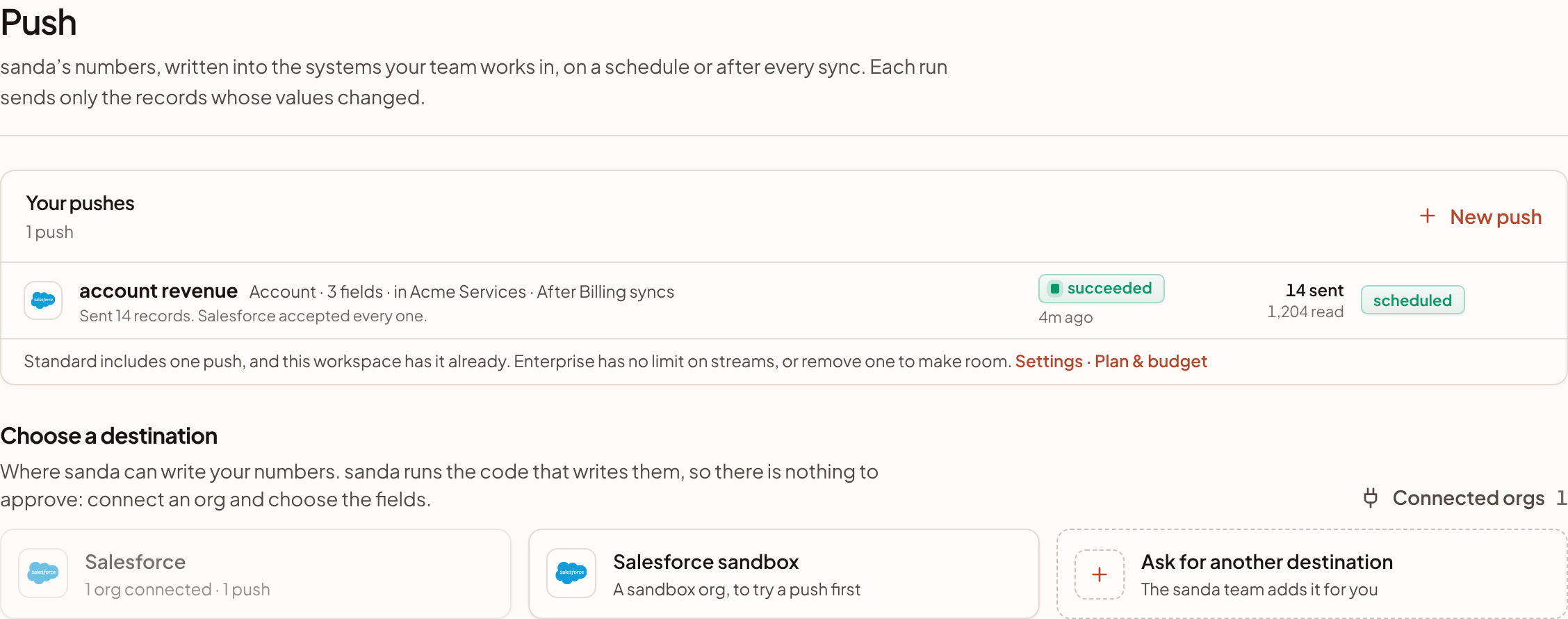
Choose a destination
Choose a destination has a card for each system a push can write to, with its logo and one line: what a push to it writes, until your workspace connects something, then what your workspace has of it. Sanda wrote and runs the code that writes to each one, so there is nothing to approve. Salesforce is one, with a second card for a Salesforce sandbox, so you can try a push there before it writes into the org your team works in. The others have a card once Sanda switches pushes to them on for your console, one destination at a time: HubSpot, Simpro custom fields, Xero manual journals, Google Ads conversions, Meta conversions, Snowflake and Postgres.
Pressing a card that connects opens the destination's own sign-in. A destination with something to know before you sign in says it first, in a note under the cards. Salesforce's is titled Connect Salesforce (Connect a Salesforce sandbox from the sandbox card) and says who to sign in as and the permission they need. Continue to Salesforce then opens Salesforce's sign-in, and Cancel closes the note. A destination where each account has an address of its own, rather than one sign-in page for everyone, asks for the address first, under the cards, and then sends you to sign in there. A destination you connect with a key or a password rather than a sign-in, such as Snowflake or Postgres, opens its own form under the cards, and Sanda checks what you enter with the destination before it keeps anything.
| The card says | What it means | What pressing it does |
|---|---|---|
| A few words on what a push there writes, such as Whole tables, or numbers onto records for Salesforce | No account is connected to it yet | Starts connecting: for Salesforce, Connect Salesforce under the cards, then its sign-in, to connect an org |
| A sandbox org, to try a push first | No Salesforce sandbox is connected yet | Shows Connect a Salesforce sandbox, then Continue to Salesforce opens the sign-in for a sandbox |
| 1 org connected · 2 pushes | Orgs connected, and the pushes that write to them. The sandbox card counts sandboxes the same way, and no push yet means none writes to them | Opens New push on the connected org (a sandbox, from the sandbox card) |
| 1 org to connect again | Salesforce stopped accepting Sanda's connection to the org, and its pushes wait until it is connected again | Shows Connect Salesforce, then Continue to Salesforce opens Salesforce's sign-in, to connect it again |
The last card, Ask for another destination, with a plus, is for a system that has no card yet. Sam can't write a destination the way it writes a pull's connector, because Sanda wrote and runs the code behind each one, so the card opens Support with a request to the Sanda team already written. Nothing is sent until you press Send.
A card is tagged connect again while any of its orgs needs connecting again, even when another one is connected, and so is Connected orgs.
A card counts only what was connected through the destination's own sign-in. A key typed into a pull's connector for the same app (a HubSpot key Sam's connector reads with, say) belongs to that pull: it is listed on Pull, and the destination's card and its accounts here leave it out.
Everyone can read the cards. A press connects an org or adds a push on the workspace's behalf, so only owners and admins can press them. When your edition's pushes are all in use, a card that would open New push can't be pressed, and pointing at it says why. Connecting another org still works, because an org isn't a push.
What counts as a change
A record has changed when what Sanda would send for it has changed: the exact values, formatted for their fields. A sync running, or a warehouse row being touched, is not a change on its own.
- A number is rounded to the field's decimal places before it is compared, so 100.004 and 100.0049 sent to a two-decimal currency field are the same value.
- An empty value clears the field. A metric with nothing to measure doesn't leave last month's number standing.
- A Salesforce Id is compared in its 18-character form, so a record that arrives once with a 15-character Id and once with an 18-character Id is one record, sent once.
Sanda records a value as sent only when Salesforce says it accepted it. A run that stops part way leaves nothing half recorded: the next run sends whatever Salesforce did not confirm.
Salesforce keeps fields current, so a changed value is sent again, however old the record is. A destination that records events instead, such as an advertising network counting conversions, works differently:
- It gets each record once. Once it has accepted a record, Sanda never sends that record again, even after its values change, because the destination would count it twice. Its push has no Send everything again: it offers to try held records again instead (see held records).
- A record older than it takes is too old to send. The run counts it as too old to send, and that is not a refusal, so a push over a moving window isn't marked partial for the rows at its far end. Where a destination has an age limit, the editor says it under the value that holds the time.
- A record too new for it, or timed in the future, waits. The run counts it as left for a later run, and a later run sends it once the destination takes it.
Editions and limits
| Edition | Pushes per workspace |
|---|---|
| Basic | not included. Push shows what the next edition adds |
| Standard | 1 |
| Enterprise | no limit |
| Trial | 1, as on Standard |
One push reads at most 50,000 records and writes at most 100 fields. A push that reads more refuses to run and says so: narrow it with a condition, or split it into streams by region or segment.
Each run that does its work is charged, and the records Salesforce accepts count as rows moved, which each edition includes some of every month. See what streams cost.
If your workspace moves to an edition with fewer pushes, it keeps every one. Its oldest keep running, up to the new edition's count, and the rest keep their definitions and wait. On Basic none of them runs. Moving back up is immediate. See editions.
What a push never does
- Delete a Salesforce record.
- Create a record when it finds records by their Id.
- Clear a field because a record has left the push. A record that no longer matches a push's conditions stops being sent to, and keeps the value it has.
- Send a value Salesforce already has.
- Spend the last 10% of your org's daily API allowance. See your API allowance.
- Record a value as sent that Salesforce did not confirm.
- Send an advertising network data from a source whose terms forbid it. A push to an advertising network checks where everything it reads came from, through every view and model built on what a pull landed, when it is saved and again before every preview and run. Deleting the pull, replacing a procedure or reusing a name doesn't change what its tables hold, so none of them clears the check. It refuses in a sentence that names what it read and the source. A procedure that builds its SQL as it runs can't be checked, so in a workspace that pulls from such a source the push refuses anything in the derived schema and names the procedure: name its tables in its SQL and the check can read it.
Who can do what
| Owners and admins | Members and read-only members | |
|---|---|---|
| See pushes, their runs and what each run couldn't deliver | Yes | Yes |
| Preview what a push would send | Yes | Yes |
| Connect or disconnect a Salesforce org | Yes | No |
| Read what a destination lists in the editor: its objects and fields, or the choices a setting offers | Yes | No |
| Create, change, pause, run or delete a push | Yes | No |
A push writes into Salesforce on the whole workspace's behalf and spends your org's API allowance, so only owners and admins change one. The editor's lists are read from the destination through your connected account, which spends the same allowance, so they are for owners and admins too. A preview reads your warehouse and sends nothing, so anyone who can open the console can ask for one.
- Connect SalesforceSign in as the user Sanda writes as.
- Create a pushChoose the object, how records are found and what goes in each field.
- Send a whole table to SalesforceA table from your semantic model, one record a row, in an object Sanda creates.
- Push to HubSpotProperties on your HubSpot records, and how a push finds and creates them.
- Write custom fields in SimproNumbers on your Simpro customers, jobs, quotes and leads.
- Send manual journals to XeroOne journal a period in your books, such as a month-end accrual.
- Send conversions to Google AdsJobs won and invoices paid, matched to the click or the customer.
- Send conversions to MetaLeads that became jobs, and their sales, matched by hashed details.
- Push to SnowflakeRows in a table of your own Snowflake account, merged only when they change.
- Push to PostgresRows in a table of your own PostgreSQL database, written only when they change.
- RunsWhat each run did, and why a record was refused or held.
Something unclear or out of date? Tell us, and we will fix the page.