What the agent is told
Read exactly what cherry and AI assistants receive about your business, and improve their answers by improving the fluid.
A customer who cannot see what an AI was told cannot trust what it said. So the Semantic fluid page shows you the real text, not a friendlier rendering of it. If a name is not in that text, the agent does not know it exists.
See it
At the foot of the Semantic fluid page is a panel headed What the agent is told. Its subtitle says what it is: "Exactly this text and these tools, compiled from the accepted rows above. Nothing else."
- Open the panel. Scroll to the foot of the Semantic fluid page and press Show. sanda compiles your accepted definitions into the text.
- Read the text. It scrolls inside the panel.
- Read the tools. Under "and these tools, onto the same fluid", each tool the agent may call is listed with its description.
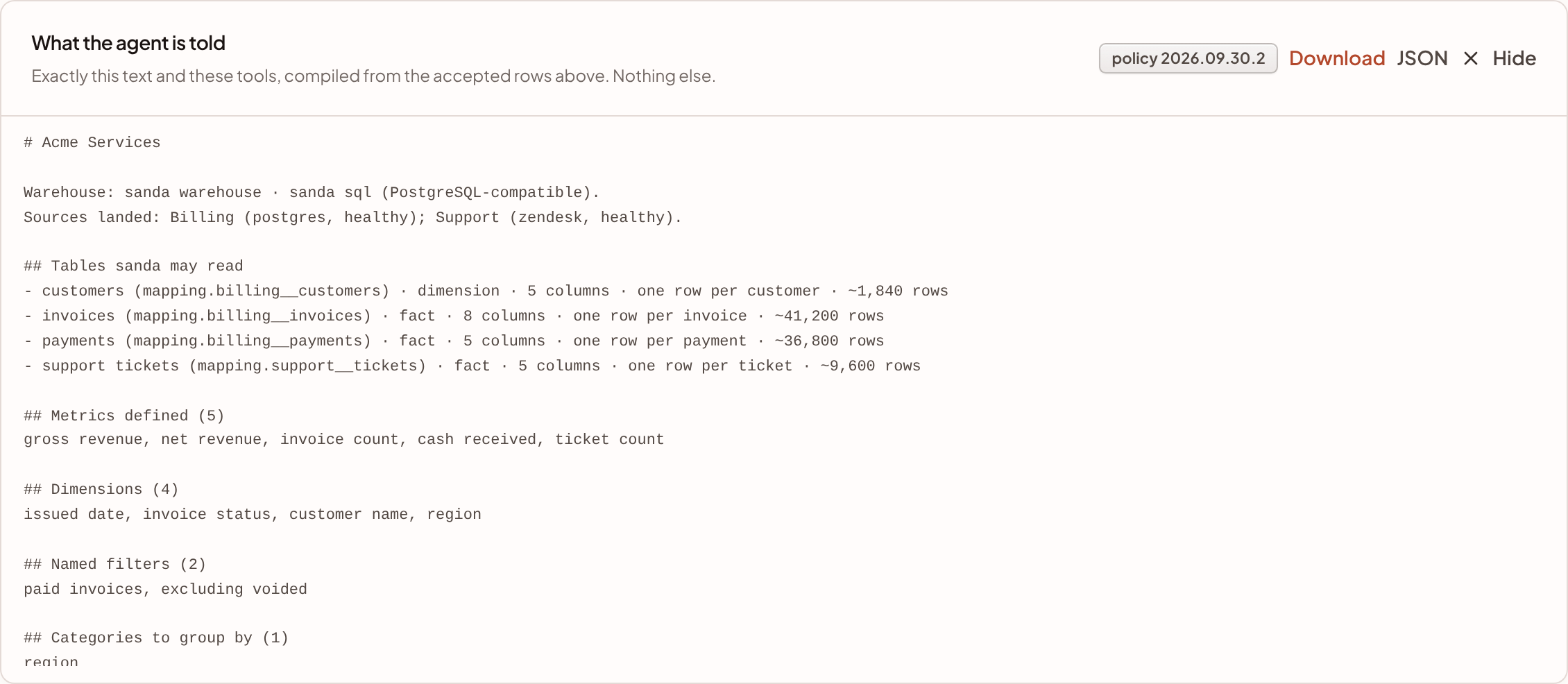
With the panel open you have four controls:
- A badge,
policyfollowed by a version, names the version of the rules in the text. The same version is recorded against every AI call, so an answer can be traced to the exact instructions behind it. - Download saves the whole fluid as one Markdown document. See the full document.
- JSON downloads the compiled data behind the text, which is useful for comparing two compilations or feeding the fluid to something else.
- Hide closes the panel.
Only accepted definitions are compiled. A suggestion waiting for review, a rejected one and a retired one are not in it.
Who receives it
The same text goes to every AI surface in sanda:
- cherry receives it with its own instructions and the tools it uses to change things.
- Questions in the reports portal are answered from it.
- AI assistants connected over MCP read it. They are given short instructions when they connect, and can read two resources: Workspace brief (
becca://fluid/brief), which is the text in this panel, and Full compiled context (becca://fluid/context), which is the download.
What is in the text
The panel shows a one-page map of your workspace: what exists, by name, and nothing an agent can look up in one call. This is an excerpt of it:
# Acme Services

Warehouse: sanda warehouse · sanda sql (PostgreSQL-compatible).
Sources landed: Billing (postgres, healthy); Support (zendesk, healthy).

## Tables sanda may read
- customers (mapping.billing__customers) · dimension · 5 columns · one row per customer · ~1,840 rows
- invoices (mapping.billing__invoices) · fact · 8 columns · one row per invoice · ~41,200 rows
- payments (mapping.billing__payments) · fact · 5 columns · one row per payment · ~36,800 rows
- support tickets (mapping.support__tickets) · fact · 5 columns · one row per ticket · ~9,600 rows

## Metrics defined (5)
gross revenue, net revenue, invoice count, cash received, ticket count

## Dimensions (4)
issued date, invoice status, customer name, region

## Named filters (2)
paid invoices, excluding voided

## Categories to group by (1)
region
In order, it holds:
- The workspace, its warehouse and the dialect of SQL, and the sources that have landed with their status.
- Tables sanda may read. One line per table: its name, relation, whether it is a fact or a dimension, its column count, its grain and an approximate row count. Modelled tables come first and say so.
- The names of every metric, dimension, named filter and category.
- Text you can search, only when you have a sanda search service.
- The rules.
Just before the rules, the text tells the agent that everything else, meaning columns, types, definitions, joins and sample values, is one tool call away, and that anything not named does not exist.
The text is short on purpose. If it listed every column and definition, every question would pay for every table to ask about one, and a wide warehouse would be cut off, leaving the agent unable to ask about a column it was never shown. A name it can see, it can look up.
The tools
The panel lists the tools the agent may call. They all read from the same fluid.
| Tool | What it does |
|---|---|
search_fluid |
Finds metrics, dimensions, named filters and tables by name or synonym. Its description tells the agent to call it before assuming a name exists |
describe_table |
Gives everything about one table: every column with its type, the grain, the key, the metrics and dimensions measured on it and every join it can reach |
run_query |
Asks a question by naming metrics, dimensions, filters and conditions. sanda composes the SQL from your definitions and runs it. This is the tool for almost every question |
run_sql |
Runs one read-only SELECT the agent wrote itself. It is the fallback, for something run_query cannot express, and it must say why, which is shown to the person |
search_documents |
Finds rows by what their text says. It is listed only when you have a sanda search service, and it never produces a total |
Not every surface gets every tool. run_sql needs the sql switch for cherry and its own permission for a connected assistant, and the reports portal gets only the first three tools.
The rules
The rules come from a versioned policy, not from anything you configure. In plain words, the agent is told to:
- Use only what is in the fluid. A metric, dimension, filter, table or column it did not find is not something it may name.
- Prefer
run_queryoverrun_sql, always, becauserun_querygives your number andrun_sqlgives its own. - Treat a refusal as an answer about the shape of the question, and re-ask the question the way the refusal suggests.
- Treat what
search_documentsfinds as evidence to query on, never as a total. - Prefer a metric over a raw column.
- Say so, and name the column, whenever it leans on a raw column nobody has mapped.
- Say in a sentence why
run_sqlwas the only way, when it was. - Never state a number it did not get back from a tool call.
- Refuse outright only when nothing in the fluid can answer, and then say what is missing.
The full document
Download gives you the whole fluid as Markdown. It is what an agent would have if the text carried everything. It holds:
- Each table as a structured object: relation, name, kind, grain, primary key, event time, row estimate, dataset, description, aliases and every column with its type. A table wider than 120 columns lists the first 120 and says how many it left out, so "the column I need isn't in what you showed me" stays a possible answer.
- Metrics, with references already expanded, their table, condition, unit and period.
- Dimensions, categories and named filters.
- Column names in business language, and stored value labels.
- Dataset groups, and the joins the agent may use, each saying which way it fans out.
## Joins you may use
Every join says which way it fans out. Aggregate the "many" side to its own grain before joining it to the "one" side, or the "one" side's values repeat and any sum over them is too large.
- mapping.billing__customers ↔ mapping.billing__invoices on mapping.billing__customers.customer_id = mapping.billing__invoices.customer_id (customer · one mapping.billing__customers to many mapping.billing__invoices)
The same fluid always compiles to the same text, in the same order, so two downloads can be compared line by line.
Improve answers by improving the fluid
Most weak answers are a gap in the fluid, and the text shows you where.
- Put the tables on the map, with the columns questions need. A column that is not on the map cannot be read. See tables and datasets.
- Define numbers as metrics. The agent is told to name any raw column it leaned on. When an answer says so, that column is your next metric. See metrics.
- Say what a row is. A grain, a key and an event time stop double counting and make "last month" mean something.
- Get fact and dimension right. Agents add up facts and never add up dimensions.
- Relate the tables, and state which end holds one row. See relationships.
- Name the conditions your team says out loud. Use named filters.
- Add the words your team uses. See aliases.
- Give one word to a way of slicing that spans systems. Use categories.
- Take stale tables off the map. Every table on the map is a name the agent has to weigh. Build the views you actually want to ask about in Modelling, and sanda will tell the agent to prefer them.
- Read the refusals. A refusal names the two tables and the reason. It usually tells you which relationship or definition is missing.
After a change, press Show again and check that the name you expect is in the text.
What is never in it
- Rows or totals from your warehouse. The text describes your data. A dimension may carry a few example values.
- Suggestions waiting for review, and anything rejected or retired.
- Tables that are not on the map, and columns you left off.
- The loader's own bookkeeping columns.
While a workspace has no warehouse of its own, the text says so: it tells the agent that the map is sanda's sample dataset, not your business.
Something unclear or out of date? Tell us, and we will fix the page.