Actions and approvals
How cherry asks before it changes anything, what Ask first and Autonomous mean, and the few actions that always need your confirmation.
Answering a question changes nothing. Building does: a metric goes live, a view uses your compute, a sync starts. So cherry has two modes for changes, and your workspace chooses one.
- Ask first is the default. Every change cherry proposes waits as a card in the conversation with Confirm and Decline. Nothing runs until you press one.
- Autonomous runs changes as soon as cherry decides to make them.
The choice is per workspace, not per person, and only owners and admins can change it. A few actions ask first in both modes. See what always asks.
Ask first
When you ask cherry to change something, it does all the work of proposing it and then stops. What you see is a card that says, in one sentence, what would happen: "create view derived.revenue_by_month", "put invoices on the map", "email “monthly operations” to finance@example.com, every Mon at 08:00 Australia/Sydney".
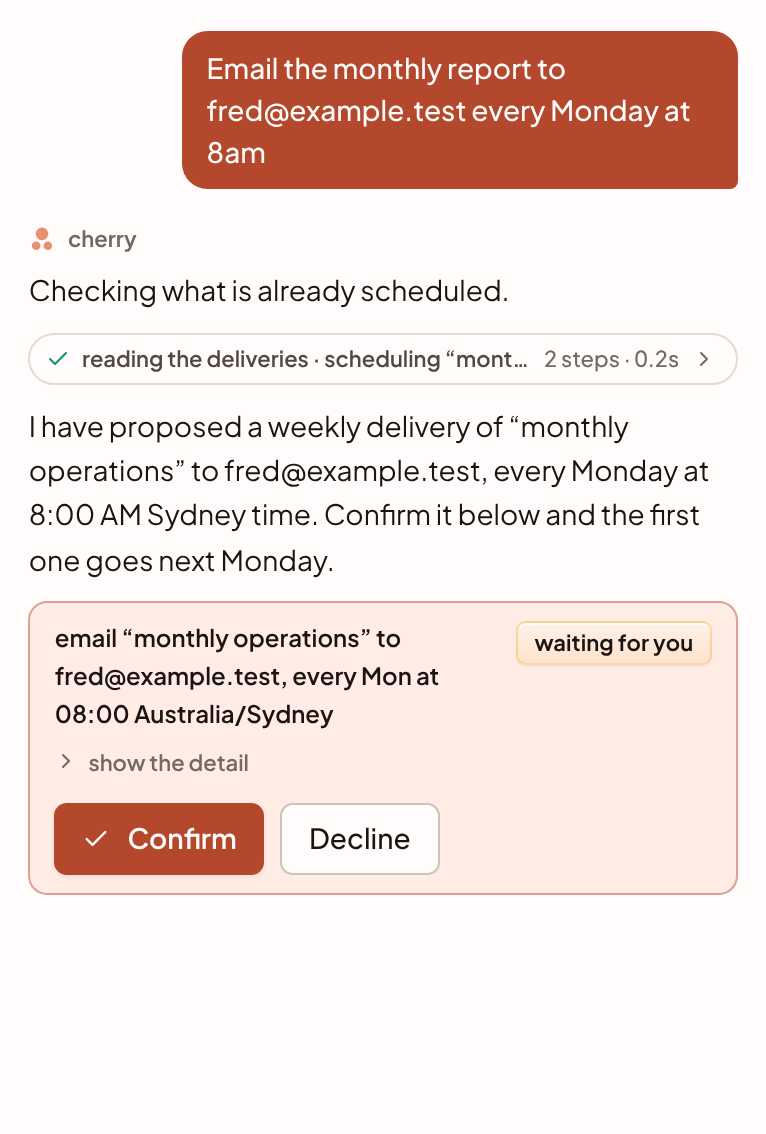
Open show the detail on a card to see exactly what will run: the SQL of a view, or the full input of any other change. A view's card also has preview 50 rows, which runs the query against your data before you commit to building it.
- Read the card. Check the sentence and, if it matters, the detail.
- Press Confirm or Decline. Confirm runs the stored change once, as you, with your own role's permissions, so it is held to the same rules as the console's buttons. Decline discards it.
- Read the result. After Confirm, a line appears in the conversation, such as "confirmed · create view derived.revenue_by_month", and cherry says in a sentence what happened. After Decline, the line reads "declined" and cherry does not reply.
A card is in one of six states: waiting for you, running, ran, failed, declined or expired. A change nobody decides on expires after 7 days, and you ask cherry again. Only the person whose conversation it is can confirm its changes.
Several changes at once
When cherry proposes several changes of one kind, such as six relationships, they come as one card with a row each. Each row has its own confirm and decline buttons, and the card has Confirm all and Decline all. When a reply is waiting on more than one kind of change, one bar under them all reads "N changes waiting for you" and confirms or declines every one.
Confirmed changes run one after another in the order cherry proposed them, which is the order they depend on each other: a table is accepted before the relationship that joins it. If one fails, the rest still run and each card shows its own result. cherry then answers once, about all of them.
Autonomous
In Autonomous mode cherry defines things on the semantic fluid, builds views, schedules tasks, starts syncs and loads rows as soon as it decides to. Settings says what that means: a metric it defines is live at once, a view it builds runs on your compute and is billed to your workspace, and a sync it starts runs now. Nobody is asked first.
Choose it when you trust the people using cherry and want fewer interruptions. You can switch back to Ask first at any time.
What always asks
These ask for your confirmation in both modes, because they cannot be taken back or cannot be recalled.
| Action | Why it asks |
|---|---|
| Take tables off the map | Every definition on the table goes with it |
| Delete a definition | It is gone for good |
| Drop a view or procedure | Its rows are gone |
| Remove a report delivery | The schedule is gone |
| Schedule, change or send an emailed report | A report in an inbox cannot be recalled |
What runs without asking
- Answering questions, and reading anything you can read.
- Creating a report, placing blocks on it and changing its filters and blocks. Every change is kept as a version you can restore from the report's history.
- Learn from my data, when you ask for it. It only files proposals, and nothing goes live until you accept them. It does use AI, so it counts towards your daily AI limit.
- Remembering a fact, searching your earlier conversations, and taking you to a page.
Everything else, in Ask first
Held in Ask first and run at once in Autonomous:
- putting tables on the map (which also draws the joins their column names state), and marking one as a fact or a dimension;
- defining a metric, dimension, filter, relationship, alias, category or dataset;
- accepting or rejecting a proposal;
- creating, replacing or rebuilding a view or procedure, and running a procedure;
- creating, running, pausing or resuming a scheduled task;
- applying warehouse tuning findings;
- starting a sync, and loading rows into the warehouse;
- pausing or resuming a report delivery.
Change the mode
Owners and admins set it under Settings · cherry, in the panel cherry · permissions, under Before it changes something. Members and viewers see the setting but cannot change it.

Below it, under What cherry may do, five switches turn whole families of change on or off for everyone in the workspace: semantics, modelling, reports, data and sql. See what cherry can do.
What is recorded
- The conversation keeps every card in the state it reached, and a line for each confirmation, decline or failure. Reopen a thread tomorrow and it reads as it did today.
- The audit trail records changes to your workspace, including a change to these settings. When cherry acts for you it acts as you, with your role's permissions.
- Reports keep a version for each change cherry makes.
Connected AI assistants
This page is about cherry, inside the console. AI assistants you connect over MCP are a separate case, with their own approval queue on the Agents page. See MCP permissions.
Something unclear or out of date? Tell us, and we will fix the page.