Set up with cherry
The five-step setup checklist cherry draws in a new workspace, what each step does, and exactly when it counts as done.
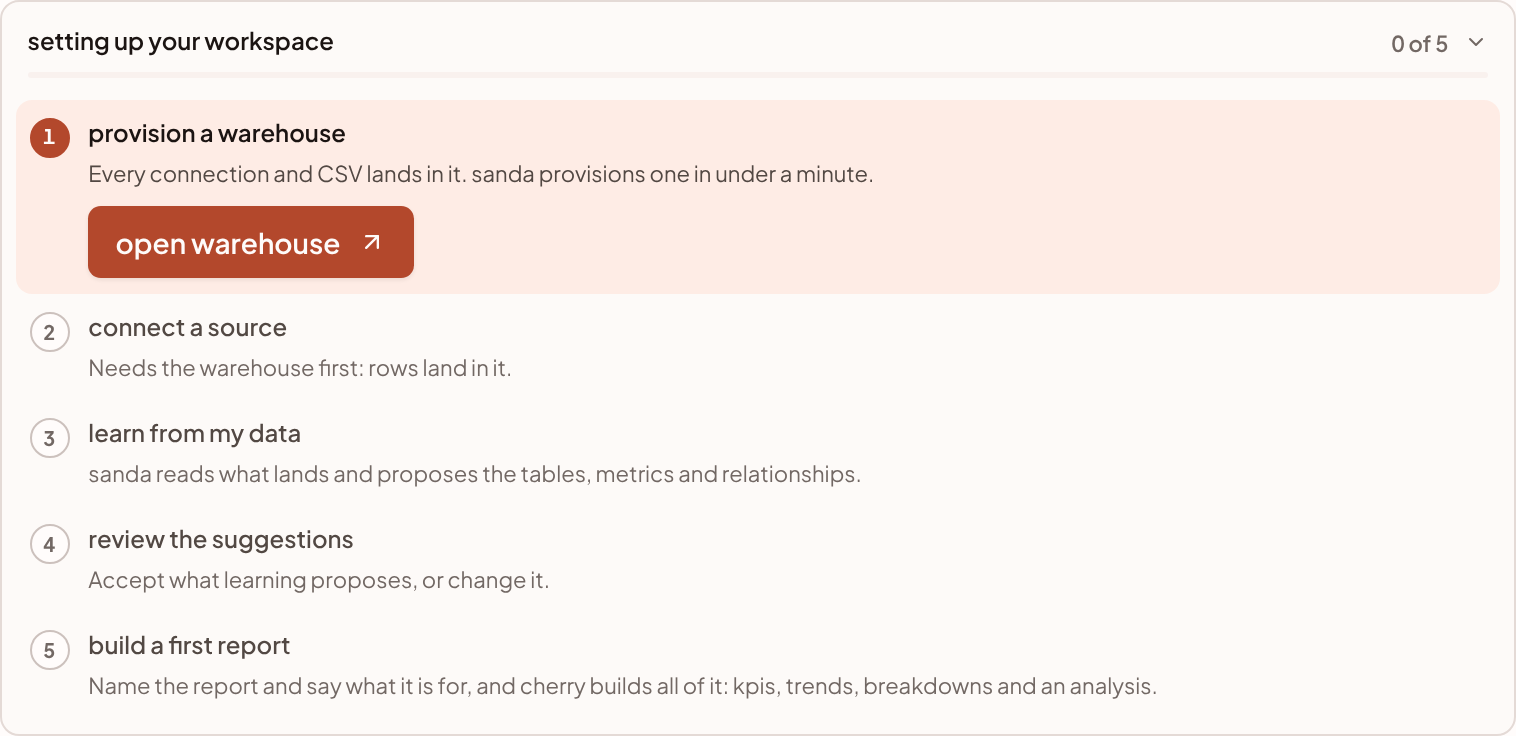
A new workspace climbs five steps, in order: a warehouse, a source, learning, review, and a first report. cherry reads where your workspace is up to and draws those steps as a checklist, so you always know the next one.
Get the checklist
Ask cherry to help you set up. On a new workspace the Overview page offers the suggestion help me set up my account, and you can type the same request in the message box or in the cherry pane at any time. Later in setup, the same suggestion reads finish setting up.
The checklist appears under cherry's reply, headed "setting up your workspace", with a count such as "0 of 5". As the conversation grows and the checklist scrolls out of sight, a folded copy stays pinned to the top with the next step and its main button. Unpin it with the pin icon, and the checklist's own card then offers pin to bring it back. When all five steps are done, the heading changes to "your workspace is set up".
Three things to know about how it behaves:
- You press every step. Nothing moves on by itself, and cherry takes no setup step you did not ask for.
- It stays current. The card reads your workspace again while it is on screen, so a step you finish on the page beside it is ticked there. An older checklist in a past conversation shows where your workspace is today, not where it was.
- The suggestions follow it. The suggestions in an empty conversation change with the next step, such as connect a source or review the suggestions. Once setup is complete, they turn to everyday asks such as "what changed this month?".
The five steps
Each step is done, next (it shows its buttons), under way (a spinner, while something it is waiting on finishes), or to do.
| Step | It counts as done when | Buttons |
|---|---|---|
| 1 · provision a warehouse | A warehouse of yours is ready to receive rows. | open warehouse |
| 2 · connect a source | Rows have landed: a connection's first sync has finished with rows, or a CSV has been loaded. A map that already has tables counts too. | connect a source, upload a csv |
| 3 · learn from my data | A learn pass has run, or your map already has metrics. Tables you add by hand do not count on their own. | learn from my data |
| 4 · review the suggestions | Learning is done and no suggestions are waiting. | review the suggestions, accept them with cherry |
| 5 · build a first report | Your workspace has at least one report. | build a first report |
Provision a warehouse
Every connection and CSV lands in a warehouse, so this comes first. open warehouse takes you to Data · Warehouse, where Provision warehouse creates one in under a minute. While it builds, the step is under way. If provisioning fails, the step says so and points you to the warehouse page to retry. See provision a warehouse.
Connect a source
The step is done when rows have landed, not when a connection is saved. Until then it tells you what it is waiting on, and its button opens the connection so you can act:
- The first sync is running. Rows land when it finishes.
- The first sync failed. The connection's page says why and runs it again.
- The connection is paused before its first sync. Only sanda support can resume it: raise a ticket under System · Support.
- The connection has not synced yet. Run its first sync from its page, or let its schedule start it.
- A sync finished but no rows landed. The connection's page shows which streams it syncs.
If you have a file rather than a system, upload a csv loads it straight in. See add a connection and upload a CSV.
Learn from my data
learn from my data takes you to the Semantic fluid page and asks cherry to read what landed and propose the tables, metrics, dimensions and relationships. You watch the proposals arrive on the map. This step uses AI, so it counts against your daily AI limit and, on a trial, your free credit. See learn from my data.
Review the suggestions
Learning proposes; you decide. review the suggestions opens the queue on the map. accept them with cherry asks cherry to go through the queue with you, accepting the ones that look right and flagging the ones it is unsure about. A relationship counts as one suggestion even though it joins two tables. See review suggestions.
Build a first report
build a first report opens a short form in the checklist. Enter a Name and What it is for, then press build the report. cherry builds the whole report from what is on your map (figures, trends, breakdowns and a written analysis) and takes you to it. If your map has more than one table, the step also offers tidy the map, which lays the tables out by how they join. It suggests doing that first, so you can check the model before a report is built on it. See build a report with cherry.
Who can do each step
Provisioning a warehouse and connecting a system need an owner or admin. Loading a CSV, learning, reviewing and building a report are open to anyone who is not read-only. When a step needs a role you do not have, the checklist says so beside it.
Related pages
Something unclear or out of date? Tell us, and we will fix the page.