Streams
Move data between your warehouse and the systems you use, as often as every few minutes. Tables and records come in, and your numbers go out.
A stream moves data between your warehouse and another system, on a schedule. There are two kinds: a pull brings data into your warehouse, and a push sends your numbers out of it.
| Pulls | Pushes | |
|---|---|---|
| Moves | A database's tables, or an app's records, into your warehouse | Your agreed numbers into fields in Salesforce |
| Reads with | Postgres or Bite, published by Sanda, or a connector Sam writes from the app's API documentation and an owner or admin approves | The editor: an object, a match field and a value per field |
| Lands as | A table per table or resource, raw.<stream>__<name> |
Field values on your Salesforce records |
| Each run moves | New and changed rows only | Changed values only |
A stream graph joins the two. Every time a pull lands rows, it runs the task that models what they feed, then starts the pushes that send the result, so a number goes out only once the rows it is built on have been modelled. The pull's schedule is the graph's one clock: the task and the pushes in it run after the pull, never on clocks of their own. See stream graphs.
A stream is not a connection. Connections sync databases, files and the apps in the catalogue through Sanda's sync engine, on the schedule grid. A stream reads a database or an app's API directly, with its own schedule and its own credential, which is what lets it run every few minutes and reach apps the catalogue does not have.
Where streams are
Streams are under Data · Streams, just below Modelling in the left navigation, once Streams is switched on for your console. Pressing Streams shows or hides the four parts nested under it, and the part you are on is lit:
- Overview: everything streaming, on one page (below).
- Pull: your pulls, what waits for approval, the catalogue of every source a pull can read from, and the databases, stores and credentials connected. In the catalogue, the sources that run as a stream come first, each with its own logo, and what syncs through a connection instead is listed below, under Alternatives (connections). See Pull.
- Push: your pushes and the destinations a push can write to, with the Salesforce orgs connected for them one press away, under Connected orgs. See Push.
- Graphs: your stream graphs, with how each one's last pass went, and any push already set to run after a pull that no graph sends yet, one press from being a graph. See stream graphs.
A stream made on the CRM's own Streams page, which brings rows into the CRM's records, belongs to the CRM: it is looked after there, and it is not listed, counted or billed here. See streams in the CRM.
The overview
Overview is where you look first. From the top:
- Streams: every stream in both directions, the ones that run first (running, scheduled or manual), then the rest (paused, suspended or waiting). The line under the heading counts them, such as "3 pulls and 1 push · 1 paused". Each stream is a row of two lines, with its source's logo: its name, whether it is a pull or a push, its source and when it runs, then what its last run did. On a wide screen the row goes on with how that run went and when, what it moved (a pull's rows and data, counting up while it runs, or a push's records sent) and the stream's state: scheduled when something starts it by itself (its schedule, or a sync or pull it runs after), manual when only Run now does, or why it isn't running. Every row keeps the same columns, so the states and last runs line up. On a phone, how the last run went sits on the second line. On a workspace with none yet, one line says what streams do, and owners and admins have Choose a source beside it, which opens Pull.
- Needs attention, only when something does: a connector waiting for an owner or admin to approve it, a database, Bite store, credential or push account (a Salesforce org, a Snowflake key pair, a Postgres password) the other side stopped accepting, a stream that paused itself or is past what your edition runs, and a last run that failed. Each line opens the place to fix it.
- Six figures: pulls and pushes against your edition's allowance and how many run by themselves, your stream graphs, runs in the last day and how many failed, rows moved this month against the rows your edition includes, and what the month has cost so far. The spend figure is worked out from this month's runs at the prices your invoice uses (runs, rows past the allowance, and the least warehouse compute those runs woke), with what your current schedules add up to a month beneath it. The billed figure is on Settings · Spend.
- Activity: rows moved and runs made, a day at a time, over the last 30 days. Point at a day on either chart and both figures answer for it.
- Stream graphs, each drawn as its three stages (pull, model, push) with how its last pass went. Press one to open it. With none yet, one line says so, and once there is a pull, owners and admins have New stream graph beside it. Below them, owners and admins see each push that runs straight after a pull lands with no graph between, with Make it a graph.
- Recent runs: the newest 8 runs across every stream.
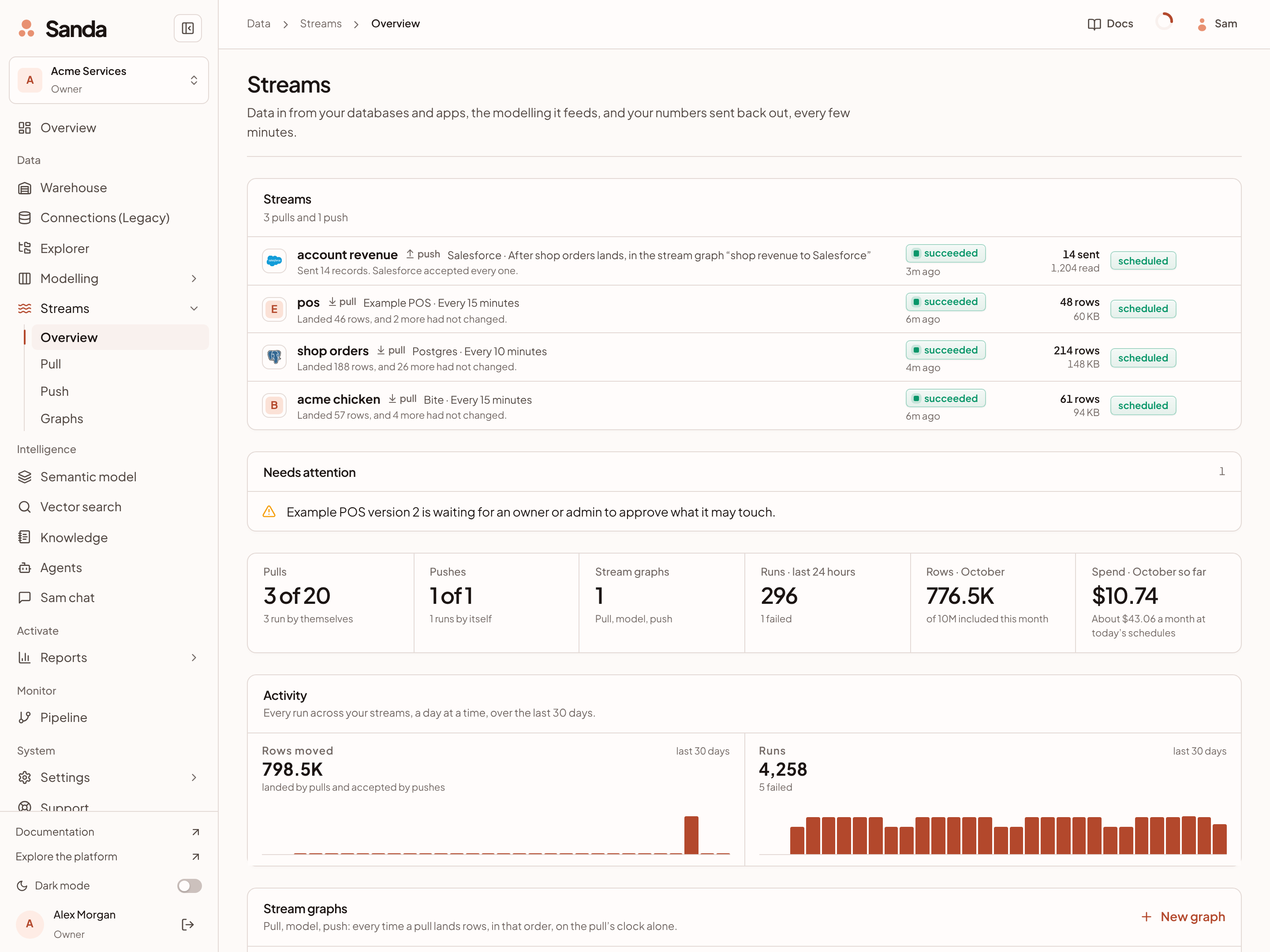
The overview changes nothing. Every verb (run, pause, approve, connect, edit) is on the stream's, connector's or graph's own page, which the overview opens.
How often a stream runs
A stream keeps its own clock, so it isn't tied to the 15 minute grid other schedules run on. It runs:
- every few minutes or hours, as often as your edition allows;
- daily or weekly at a time of day, in your time zone;
- after something lands, for a push: a connection's sync, a pull, or a stream graph's modelling, one of them;
- by hand, when someone presses Run now.
When a run is still going as its next slot comes round, that slot is skipped rather than queued behind it, and the stream's page counts how many were skipped. For now a workspace's streams run one at a time, so a run that finds another stream's run under way waits for its turn. See runs at once.
Editions and limits
| Basic | Standard | Enterprise | |
|---|---|---|---|
| Pulls | not included | 20 | no limit |
| Pushes | not included | 1 | no limit |
| Fastest schedule | not included | every 15 minutes | every 5 minutes |
| Rows included a month | not included | 10,000,000 rows | 50,000,000 rows |
A trial has Standard's streams. A workspace that moves to an edition with fewer streams keeps every one: the oldest keep running up to the new edition's count, and the rest keep their definitions and wait, saying why. A stream scheduled more often than the new edition runs one skips its scheduled runs, saying so, until its schedule is changed. Moving back up is immediate. See editions.
What streams cost
Streams are on two lines of your invoice:
- Stream runs. Each run that does its work is A$0.000182, whatever it moved. A run that fails, or is skipped, is not counted.
- Stream rows. The rows streams move: rows a pull landed new or changed, and records a push's destination accepted. Each edition includes some every month, and the rest are A$20 a million. A run that finds nothing new moves nothing on this line.
A run also wakes your warehouse for a minute or more, which is billed as compute, like any other work on it. That is usually the larger part: a stream that runs every few minutes keeps your warehouse awake for much of the day, so choose the slowest schedule your team really needs. A stream every 15 minutes wakes it four times as often as one every hour.
You don't have to work it out. Where you choose a stream's schedule, the editor says what it costs a month at that schedule: its runs, and the least compute they wake. Once a stream has run, its page adds its rows at its recent pace, leaving out its first load. A stream with no schedule says what one run costs, and once it has run, what it costs a month at the pace it has been running. The estimate uses the prices your invoice uses.
Who can do what
| Owners and admins | Members and read-only members | |
|---|---|---|
| See streams, stream graphs, their tables, runs and passes | Yes | Yes |
| Preview what a push would send | Yes | Yes |
| Ask Sam to build a pull, and try its connector | Yes | No |
| Approve a connector, connect or disconnect a credential or a database | Yes | No |
| Create, change, pause, run or delete a stream or a stream graph | Yes | No |
A stream acts on the whole workspace's behalf with the workspace's credentials, so only owners and admins change one.
- Stream graphsPull, model and push, every time a pull lands rows.
- PullA database's tables or an app's records, landed in your warehouse.
- Stream a Postgres databaseConnect it, choose its tables, and they arrive every few minutes.
- Stream a Bite storeA store's customers, orders, promotions and loyalty, every few minutes.
- Build a pull with SamFrom the app's documentation to a running pull.
- PushYour numbers, written into Salesforce fields.
- RunsWhat each run did, and what to do when one fails.
Something unclear or out of date? Tell us, and we will fix the page.